
Most people hear “AI” and immediately think ChatGPT or Gemini (maybe even Grok?).
Claude belongs in that same top tier, but it’s built to feel less like some smart chatbot and more like a serious work assistant for long, messy, real-world documents. If your day includes PDFs, contracts, investor decks, clinical guidelines, meeting notes, or SOPs that are too long to wrangle easily, Claude is often the AI that feels the most “at home” with that kind of workload.
In other words: if ChatGPT is the tool many people try first, Claude is often the tool they switch to when their inputs stop being short prompts and start being real documents.
So if this is you, and you’re looking for an AI for all the “paperwork”, here’s everything you need to know about Claude AI.
Disclaimer: While these are general suggestions, it’s important to conduct thorough research and due diligence when selecting AI tools. We do not endorse or promote any specific AI tools mentioned here. This article is for educational and informational purposes only. It is not intended to provide legal, financial, or clinical advice. Always comply with HIPAA and institutional policies. For any decisions that impact patient care or finances, consult a qualified professional.
What is Claude AI?
Claude is an AI assistant made by Anthropic. You can chat with it, paste in content, and ask it to produce useful outputs: summaries, drafts, outlines, checklists, rewritten copy, and structured plans. You can use Claude in a web app (the easiest way), desktop apps, or via API if you want to connect it to internal systems.
Claude is widely liked for two practical strengths:
- It can handle longer context (so you can give it more of the full picture).
- It has a feature called Artifacts, which turns outputs into clean, editable “deliverables” (like a document workspace), instead of burying everything inside a chat thread.
Claude AI vs ChatGPT vs Gemini: What Is Different?
At a high level, Claude, ChatGPT, and Gemini can all write, summarize, brainstorm, and help you think. The differences show up when you’re trying to do real work fast.
Claude tends to stand out when:
- You want an assistant that leans cautious and structured, especially in high-stakes fields.
- You want to paste in a lot of text and keep it coherent.
- You want to produce a polished deliverable and refine it cleanly (Artifacts).
| What you care about | Claude | ChatGPT | Gemini |
|---|---|---|---|
| Best for | Long documents, structured writing, “make this usable” workflows | Broad all-around assistant, strong tool ecosystem, creative + analytical flexibility | Strong Google ecosystem tie-ins, multimodal strengths depending on plan |
| Handling long inputs | Often a standout strength | Strong, varies by model/plan | Strong, varies by model/plan |
| “Workspace” for drafts | Artifacts make outputs feel like editable docs/projects | Can draft well; workspace depends on product features | Can draft well; workspace depends on product features |
| Tone/behavior | Often cautious, principled, good at clarity | Often more flexible in style and approach | Often efficient, can be more “search/productivity” oriented |
| When it’s a great choice | You’re working from PDFs, OMs, SOPs, transcripts, policies | You want one tool for almost everything | You live in Google apps and want tight integration |
Claude AI Pricing
- Free: good for trying it and occasional tasks.
- Paid individual plans: generally range from about $20/month for regular use to roughly $100–$200/month for heavy daily use and higher limits.
- Team/business plans: typically priced per user per month, starting in the tens of dollars per user, with higher tiers for advanced security/admin features.
- API: pay based on usage; best if you want repeatable internal workflows.
You can check out their pricing overview here.
How to Use Claude Safely (Without Getting Yourself in Trouble)
The safest way to use Claude is to treat it like a drafting, organizing, and summarizing assistant. It’s awesome at turning long, messy info into clean notes, templates, and first drafts.
What it’s not?
A decision-maker. Not your legal advisor. Not your tax person. Not your clinician. Not your expert witness. (Basically, don’t hand it the keys to the car.)
Here’s the simple rule I use:
Claude helps you prep your thinking. You do the confirming.
So you verify facts, review the final wording, double-check numbers, and bring in real professionals when it’s medical, legal, financial, compliance-related, or patient-specific. The magic is letting Claude do the “blank page” work, and you doing the adult supervision.
For Physicians…
If you’re a physician, the safest Claude workflows are the ones that reduce writing and admin pain without creeping into diagnosis or treatment.
Think: turning non-patient-specific material into usable stuff like:
- staff checklists
- training summaries
- scripts for front desk and ops
- general education content (that you review)
Example: paste a long policy update or clinic memo and ask Claude to rewrite it into a short staff summary with clear next steps.
You can also draft general patient templates that aren’t personalized medical advice, like:
- appointment reminders
- visit prep instructions
- “here’s how our clinic works” explanations
The rule stays the same every time: review everything before it leaves your practice, don’t include sensitive patient data, and don’t ask Claude to make clinical calls. If it touches medical judgment, that stays with you.
If your goal is reclaiming hours without adding risk, pair Claude with proven workflows that manage time efficiently in medicine instead of trying to use AI for anything patient-specific.
For Investors…
Claude can be helpful as an “analyst who drafts your notes,” not a tool that tells you what to buy.
Where it shines:
- turning long deal materials into structured summaries
- creating diligence checklists
- generating a list of clarifying questions from a deck, memo, or notes
- making a one-page summary of what’s being claimed, what’s missing, and what should be verified
This helps you move faster without cutting corners.
But here’s the catch: Claude doesn’t verify facts. You still confirm claims, validate assumptions, cross-check numbers, and loop in pros for legal, tax, and compliance.
Safe pattern: summarize and organize first, verify everything second, decide last.
For Entrepreneurs…
If you’re building something, Claude is great for “version one” work, especially writing and organizing.
Safe use cases:
- internal docs and SOPs
- onboarding checklists
- meeting notes turned into action items
- first drafts of marketing copy (that you review for accuracy and compliance)
Claude works best when you give it lots of context: product notes, brand guidelines, FAQs, process steps. You’re using it to speed up production, not invent claims. (Because invented claims are how you end up in a weird email thread later.)
If you’re hiring or delegating, it also helps to think in terms of systems and roles. This pairs well with resources on AI team building so you’re not just producing faster drafts, you’re improving the workflow behind them. Also, if you have a startup, check out these 3 AI tools for physician entrepreneurs.
Same due diligence rules apply: review before publishing, avoid sensitive customer info, and don’t rely on AI for legal claims, financial promises, or compliance decisions.
Best workflow: fast draft first, human review pass second, publish third.
Best Claude AI Prompts for Saving Time
If you want Claude to be useful quickly, use prompts that ask for a specific deliverable.
- “Turn this long document into a one-page summary with headings.”
- “Extract key risks, assumptions, and open questions.”
- “Create an SOP from this process and format it as steps.”
- “Rewrite this email so it is clear, short, and friendly.”
- “Create a reusable template I can use next time.”
If you’re still ramping up, focus on a few foundational AI skills for physicians so your prompts get clearer and your outputs get more consistent.
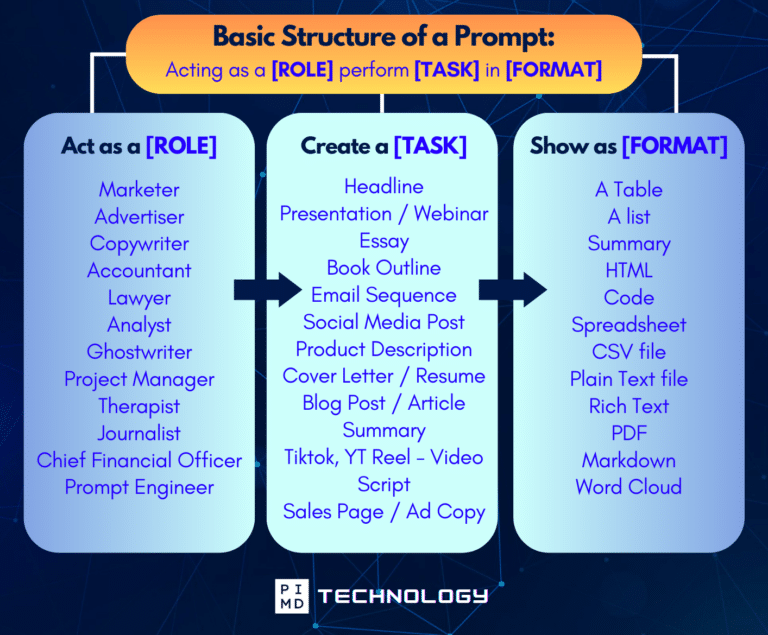
Unlock the Full Power of ChatGPT With This Copy-and-Paste Prompt Formula!
Download the Complete ChatGPT Cheat Sheet! Your go-to guide to writing better, faster prompts in seconds. Whether you’re crafting emails, social posts, or presentations, just follow the formula to get results instantly.
Save time. Get clarity. Create smarter.
Final Thoughts
Most days, the “paperwork” pile feels like it breeds overnight.
One minute it’s a couple PDFs, and the next it’s contracts, decks, SOPs, and meeting notes staring at you like, “Good luck, buddy.”
But here’s the real win. You don’t have to hand over your brain. Treat Claude AI as something that organizes your thinking, not a decision-maker who replaces it. Let it do the first pass, the structure, the checklist, the “what’s missing?” Then you come in and verify, refine, and make the call.
And again, if you’re in medicine, investing, or running a business, that reclaimed time is not just productivity. It is breathing room for the stuff that matters most. For a lot of physicians, that breathing room is the start of career freedom and, over time, real financial freedom.
So if you’ve been drowning in documents, maybe this is your nudge. Start small. Paste one ugly doc in. Ask for a one-page summary and next steps. Build momentum.
What would you finish this week if the blank page stopped winning? Let us know what you think!
Download The Physician’s Starter Guide to AI – a free, easy-to-digest resource that walks you through smart ways to integrate tools like ChatGPT into your professional and personal life. Whether you’re AI-curious or already experimenting, this guide will save you time, stress, and maybe even a little sanity.
Want more tips to sharpen your AI skills? Subscribe to our newsletter for exclusive insights and practical advice. You’ll also get access to our free AI resource page, packed with AI tools and tutorials to help you have more in life outside of medicine. Let’s make life easier, one prompt at a time. Make it happen!
Frequently Asked Questions About Claude AI
Is Claude AI better than ChatGPT?
Claude AI is not universally better. It is often a better fit when your workflow involves long documents, and you want structured deliverables like memos, SOPs, and clean drafts.
ChatGPT may be a better fit if you want one tool for a wide range of tasks and features. If your goal is mainly productivity, you might also like frameworks such as this ChatGPT trick for doctors and then compare how Claude handles the same workflow with long inputs.
Can doctors use Claude AI for clinical decisions?
Claude can help summarize information and draft patient communication, but clinicians should keep final clinical judgment and verification in human hands. The safest use is drafting and organizing, not diagnosis or treatment decisions without clinician review.
Is Claude AI safe for investors and entrepreneurs?
Claude can be used safely when you avoid sensitive data, treat it as a drafting assistant, and verify important claims and numbers. For legal and tax decisions, use qualified professionals.
Disclaimer: The information provided here is based on available public data and may not be entirely accurate or up-to-date. It’s recommended to contact the respective companies/individuals for detailed information on features, pricing, and availability. All screenshots are used under the principles of fair use for editorial, educational, or commentary purposes. All trademarks and copyrights belong to their respective owners.
Images used in this article are for editorial and informational purposes only and are sourced from publicly available product pages and promotional materials provided by their respective companies. Microsoft Edge with Copilot images courtesy of Microsoft. Arc Browser images courtesy of The Browser Company. Brave Browser and Leo AI images courtesy of Brave Software, Inc. All product names, logos, and interface designs are trademarks or registered trademarks of their respective owners. No affiliation or endorsement is implied.
If you want more content like this, make sure you subscribe to our newsletter to get updates on the latest trends for AI, tech, and so much more.
Further Reading

