
Think about how much you write in a single day.
You send emails, reply to messages, take notes, write reports, and post on social media. Even quick responses on your phone start to add up. Writing is no longer occasional. It is constant.
Research suggests that knowledge workers spend roughly 25 to 30 percent of their workday writing. That translates to hours every day spent turning thoughts into words.
Now consider the downside.
Even small writing mistakes can carry real consequences. A poorly written email can create confusion. A typo in a professional message can reduce credibility. Unclear writing slows decisions and creates unnecessary back-and-forth.
In environments like medicine, business, and leadership, clarity is a must. It directly impacts how effective you are. If you are looking to optimize your output, learning AI skills is the best way to stay competitive. One of the most practical and widely used tools today is Grammarly AI.
Disclaimer: While these are general suggestions, it’s important to conduct thorough research and due diligence when selecting AI tools. We do not endorse or promote any specific AI tools mentioned here. This article is for educational and informational purposes only. It is not intended to provide legal, financial, or clinical advice. Always comply with HIPAA and institutional policies. For any decisions that impact patient care or finances, consult a qualified professional.
1. What Grammarly AI Actually Does
Many people think Grammarly is just a spell checker, but it is actually an AI-powered writing assistant that improves your writing in real time. It looks beyond grammar and focuses on clarity, tone, and overall effectiveness.
When a sentence feels awkward, it suggests a cleaner version; when a message sounds too blunt, it adjusts the tone to match your intent.
This is a vital part of physician coaching and professional development, as tone can change how your message is received. Recently, its features have expanded to help you generate drafts and rewrite entire sections, supporting your thinking process rather than just correcting it.
2. How to Install Grammarly and Start Using It
One of the reasons Grammarly is so effective is that it fits into tools you already use. There is no need to change your workflow or learn a new system.
The most common setup is the browser extension. You can install it on Chrome, Safari, Edge, or Firefox. Once installed, it automatically works across websites where you write, including Gmail, LinkedIn, Google Docs, and most platforms with text input fields. Setup takes only a few minutes and runs quietly in the background.
There is also a desktop version for those who prefer writing in a dedicated environment. This works well for longer documents or focused writing sessions.
An often overlooked option is the mobile keyboard. Installing Grammarly on your phone allows it to check and improve your writing in texts, emails, and social media apps. Since a large portion of daily communication happens on mobile, this can have a surprisingly large impact.
The overall experience is seamless. You write as you normally would, and Grammarly provides suggestions in real time without interrupting your flow.
Step-by-step setup:
- Go to the Grammarly website and create a free account
- Download the browser extension for Chrome, Safari, Edge, or Firefox
- Turn on the extension and allow it to run in your browser
- Start writing in places you already use, like Gmail, Google Docs, or LinkedIn
- Watch for suggestions that appear automatically as you type
- Click on suggestions to accept or ignore based on your preference
Because so much of our daily communication happens on the go, using these mobile AI apps can have a surprisingly large impact on your professional presence.
3. Pricing and How to Use It Effectively
Grammarly offers both a free and a premium version. While the free version covers basic grammar and spelling, the premium version offers advanced rewrites and AI-powered assistance to refine content more efficiently.
For those using virtual assistant services, Grammarly is an excellent tool to ensure that all outgoing communications remain high-quality and consistent. To use it effectively, you should:
- Write naturally first: Focus on getting your ideas out without overthinking.
- Review suggestions: Accept the ones that improve clarity and ignore those that don’t match your voice.
- Identify patterns: Over time, you will recognize your repeated mistakes, leading to gradual improvement even without the tool.
The goal is not perfection. The goal is clearer and faster communication.
One of the biggest advantages is speed. Grammarly helps reduce the time spent editing and rewriting. Instead of rereading the same sentence multiple times, you get immediate feedback.
Over days and weeks, this time savings becomes significant.
It also helps you develop better writing habits. As you see repeated suggestions, you begin to recognize patterns in your own writing. This leads to gradual improvement even without the tool.
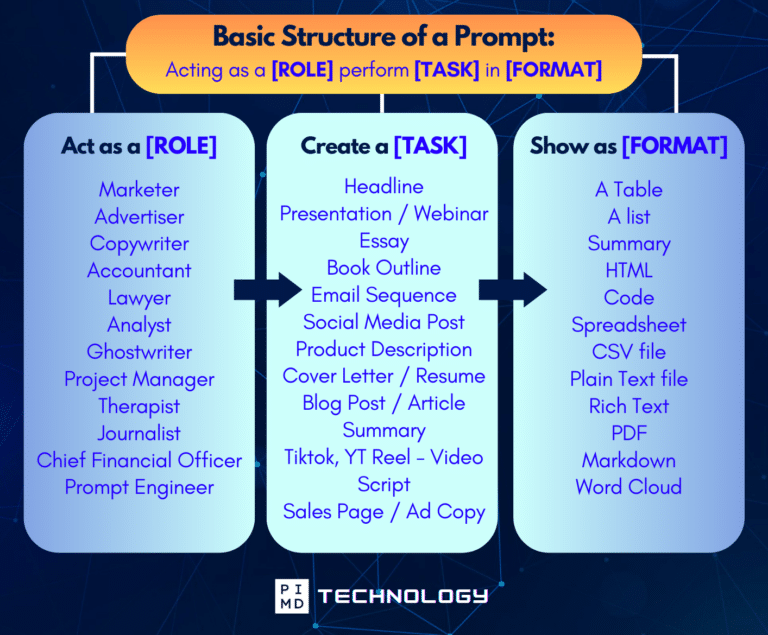
Unlock the Full Power of ChatGPT With This Copy-and-Paste Prompt Formula!
Download the Complete ChatGPT Cheat Sheet! Your go-to guide to writing better, faster prompts in seconds. Whether you’re crafting emails, social posts, or presentations, just follow the formula to get results instantly.
Save time. Get clarity. Create smarter.
Final Thoughts
Writing is one of those skills that is easy to overlook because you use it every day. It just becomes part of the routine. But when you really stop and think about it… It shapes how you communicate, how you are perceived, and how efficiently you work.
If you are writing dozens or even hundreds of messages each week, those small improvements in clarity and tone start to add up more than you might expect. Whether you are a business owner or a clinician, improving your medical workflow through better communication leads to faster decisions and fewer misunderstandings.
To be perfectly clear, Grammarly AI does not replace your thinking. It simply supports it. It helps remove some of that friction from the writing process and makes it easier to say exactly what you mean, without overthinking every sentence.
And over time, those small gains compound.
What feels like a minor tool at first can quietly turn into a real advantage.
Because in a world where so much happens through written communication, how well you write ends up directly affecting how effective you are, whether you notice it or not. But what do you think? Let us know what you think in the comments below!
Download The Physician’s Starter Guide to AI – a free, easy-to-digest resource that walks you through smart ways to integrate tools like ChatGPT into your professional and personal life. Whether you’re AI-curious or already experimenting, this guide will save you time, stress, and maybe even a little sanity.
Want more tips to sharpen your AI skills? Subscribe to our newsletter for exclusive insights and practical advice. You’ll also get access to our free AI resource page, packed with AI tools and tutorials to help you have more in life outside of medicine. Let’s make life easier, one prompt at a time. Make it happen!
Disclaimer: The information provided here is based on available public data and may not be entirely accurate or up-to-date. It’s recommended to contact the respective companies/individuals for detailed information on features, pricing, and availability. All screenshots are used under the principles of fair use for editorial, educational, or commentary purposes. All trademarks and copyrights belong to their respective owners.
If you want more content like this, make sure you subscribe to our newsletter to get updates on the latest trends for AI, tech, and so much more.
Further Reading

