
Most physicians don’t have a knowledge problem. They have a time and repetition problem.
You’re rewriting similar emails, summarizing the same information, planning similar projects over and over, every week. It adds up quietly. Ten minutes here. Twenty there. By Friday, you’ve lost hours to tasks that were barely different from the ones you did last Monday.
AI gets pitched as something revolutionary. Maybe it is, eventually. But honestly, the useful version right now is more boring than that. It removes repetition. Build one prompt that works, reuse it for similar tasks, stop starting from scratch. That’s the actual time savings.
This article is about that one prompt.
Disclaimer: While these are general suggestions, it’s important to conduct thorough research and due diligence when selecting AI tools. We do not endorse or promote any specific AI tools mentioned here. This article is for educational and informational purposes only. It is not intended to provide legal, financial, or clinical advice. Always comply with HIPAA and institutional policies. For any decisions that impact patient care or finances, consult a qualified professional.
The Core Idea
Most people use AI like a search bar. New request every time, new result, move on. That works fine. It’s just slow, and it means you’re doing the thinking every single time instead of building anything reusable.
A better approach is to create one structured prompt that tells AI three things: who it should act as, what it should do, and what the output should look like. Once you have that, you’re not figuring out how to phrase a question anymore. You’re swapping in a new task and running it.
The structure:
Act as → Task → Format
Short, yes. But it forces clarity in a way that open-ended prompts don’t.
The Prompt Template
Here’s what it looks like in practice:
Act as a [role].
Your task is to [specific task].
Use the following context if helpful: [insert context]
Show the output as: [clear format]
A few notes on why each part matters.
Role changes the lens. “Act as a physician” and “act as a consultant” will give you different tones and different assumptions about what you already know. It’s a small thing that matters more than you’d expect.
Task clarity is everything. Vague prompts produce vague output. “Help me with this” tells AI nothing. “Summarize this article into 5 key takeaways for a busy physician who needs to decide whether to read the full paper” tells it exactly what you need. There’s a real difference in what comes back.
Context is optional but worth adding. Even one sentence about your audience or your constraints changes the output significantly. Don’t skip it when you have it.
Format is the most commonly forgotten piece. AI doesn’t know whether you want bullet points or paragraphs, an email or an outline. Tell it. You’ll spend less time reformatting the result.
Three Ways to Use It
Same structure, different tasks.
Writing. When you’re staring at a blank page, or rewriting a version of something you’ve already written a dozen times, this is where the template earns its keep. Tell it to act as a content writer for physicians, give it the audience and the goal, and ask for a short email with a clear call to action. You’ll have a draft in 30 seconds. Something you can actually edit, rather than build from nothing.
That matters more than it sounds. Starting is the hardest part for most people. A rough draft that needs fixing is infinitely easier to work with than a blank page.
Planning. When you have a project idea in your head and need it turned into steps, the template works well here too. Act as a productivity coach, describe your constraints, ask for a step-by-step weekly plan. It’s useful for getting scattered thoughts into a workable structure without spending an hour thinking out loud to yourself.
For physicians specifically, this tends to show up in things like planning a side project, preparing for a speaking engagement, or working through the early steps of a real estate deal or business idea. These aren’t complicated to plan. They just take mental bandwidth you often don’t have at the end of a clinical day.
Research. When you need to know what an article or topic actually says without reading every word of it. Act as a medical research assistant, paste in the topic or article, ask for five practical takeaways. This isn’t a substitute for deep reading when that genuinely matters. But it’s useful for staying informed without drowning in it.
The honest version of this use case is: there’s more worth reading than there is time to read it. A quick summary that tells you whether something deserves more of your attention is a reasonable filtering tool.
Why the Structure Works
You could just type whatever comes to mind and get decent results. AI has gotten good enough that freeform prompts often work.
But the reason the structure helps isn’t because AI needs it. It’s because it forces you to be specific about what you actually want before you ask. That clarity shows up in the output.
Most of the time when AI gives a mediocre result, the prompt was vague. Not because the person using it wasn’t smart, but because the format let them be vague. A structure with clear fields, role, task, format, doesn’t let you skip those questions.
It also makes the habit stick. If you’re building a new mental model every time you use a tool, you won’t use it consistently. A repeatable structure is what turns a useful experiment into an actual workflow.
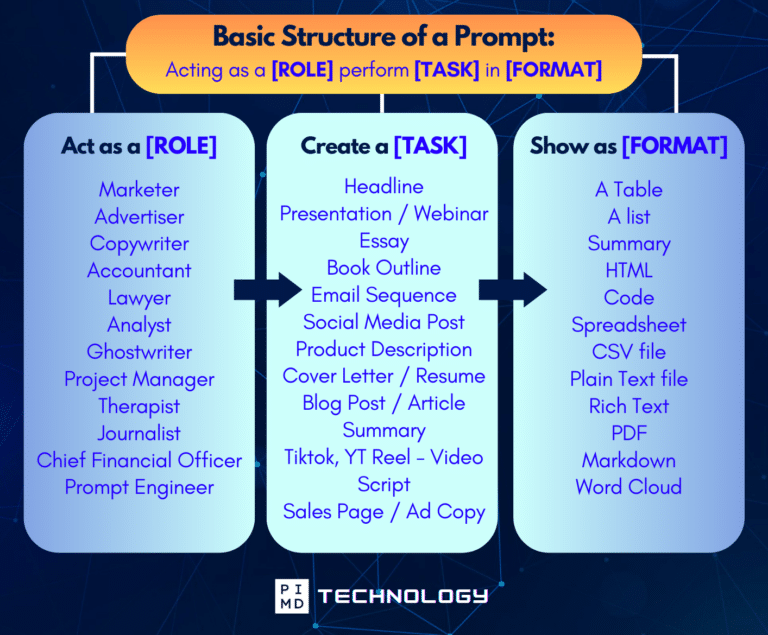
Unlock the Full Power of ChatGPT With This Copy-and-Paste Prompt Formula!
Download the Complete ChatGPT Cheat Sheet! Your go-to guide to writing better, faster prompts in seconds. Whether you’re crafting emails, social posts, or presentations, just follow the formula to get results instantly.
Save time. Get clarity. Create smarter.
The Real Habit
Save the template somewhere you’ll find it. Somewhere obvious. Use it when something comes up that fits: writing, planning, research. Swap in the task, add a sentence of context, run it. That’s the whole system.
It doesn’t require committing to a new tool or climbing a learning curve every week. It just requires using the same structure consistently enough that it becomes automatic.
The physicians who get real time savings from AI aren’t using 15 different tools. They’ve got a few reliable methods that they actually use, repeatedly, on the kinds of tasks that keep coming back.
This is one of them.
One Caution Worth Repeating
Consumer AI tools aren’t built for patient data. Don’t paste in clinical notes, don’t enter patient identifiers, don’t share anything protected.
Keep use cases in the range of general workflows, business writing, education, and non-clinical tasks. If you’re unsure whether something is sensitive, the default is simple: don’t enter it.
That constraint is actually pretty easy to work within. The time savings are real even when you stay entirely outside clinical data.
Have you tried building a reusable prompt for anything in your workflow? Curious what’s actually saved you time and what hasn’t.
Download The Physician’s Starter Guide to AI – a free, easy-to-digest resource that walks you through smart ways to integrate tools like ChatGPT into your professional and personal life. Whether you’re AI-curious or already experimenting, this guide will save you time, stress, and maybe even a little sanity.
Want more tips to sharpen your AI skills? Subscribe to our newsletter for exclusive insights and practical advice. You’ll also get access to our free AI resource page, packed with AI tools and tutorials to help you have more in life outside of medicine. Let’s make life easier, one prompt at a time. Make it happen!
Disclaimer: The information provided here is based on available public data and may not be entirely accurate or up-to-date. It’s recommended to contact the respective companies/individuals for detailed information on features, pricing, and availability. All screenshots are used under the principles of fair use for editorial, educational, or commentary purposes. All trademarks and copyrights belong to their respective owners.
If you want more content like this, make sure you subscribe to our newsletter to get updates on the latest trends for AI, tech, and so much more.
Further Reading

