
Imagine kicking off a few AI tasks before bed and waking up to an $82,314 bill.
Yes, that actually happened. A small development team’s Google Cloud API key got compromised and ran up $82,314 in unauthorized Gemini charges in 48 hours. Their normal monthly spend was about $180.
Imagine the shock!
But here’s the thing. Almost every piece of advice about using AI well is about prompting better. Write clearer instructions. Give more context. Ask follow-up questions. You know, the usual.
That advice is fine… But it also won’t totally protect you from the mistakes that actually cost you something.
The real risks don’t show up as a bad answer. They show up as a leaked credential, a confidential document sitting on somebody else’s server, or a decision made with way too much confidence in an output that was wrong from the start.
These aren’t beginner mistakes. They’re the ones smart, capable people make because nobody told them to think about it. Six of them, each with a documented incident behind it.
Let’s talk more about them so you don’t make the same mistakes.
Disclaimer: While these are general suggestions, it’s important to conduct thorough research and due diligence when selecting AI tools. We do not endorse or promote any specific AI tools mentioned here. This article is for educational and informational purposes only. It is not intended to provide legal, financial, or clinical advice. Always comply with HIPAA and institutional policies. For any decisions that impact patient care or finances, consult a qualified professional.
1. Keep Your Credentials Out of the Chat Window
This sounds like a developer problem. It isn’t.
If you’ve connected an AI tool to anything else, a CRM, a scheduling system, a custom internal tool, you’ve dealt with API keys. Those long strings of characters that let one system talk to another.
The mistake is pasting that key into a chat window to troubleshoot something. Or leaving it sitting in code you shared for review.
Security researchers at Cyble found more than 5,000 public GitHub repositories and roughly 3,000 live production websites leaking ChatGPT API keys in 2026, either hardcoded into source files or sitting in client-side JavaScript where anyone can see them.
The fix is pretty straightforward, but it’s a habit change. Credentials belong in a password manager or a secrets vault. Never typed into a chat, never pasted into a doc you’re handing to an AI.
If you need to reference a key while troubleshooting, describe the problem instead of pasting the actual value. And set billing alerts as a backstop. Alerts catch runaway usage a lot faster than a monthly invoice does.
2. Stop Assuming Your Chats Are Private
Back in 2023, Samsung employees used ChatGPT to troubleshoot source code and summarize an internal meeting. To do it, they pasted proprietary source code and confidential meeting notes straight into the chat.
Three separate incidents in a single month. Samsung banned employee use of AI chatbots shortly after.
Those employees weren’t being reckless. They were trying to work faster.
The problem was an assumption. They treated a chat with an AI tool like a private notebook, when it’s actually a system where what you type may be retained, reviewed, or used depending on that platform’s data policy.
For physicians, the stakes go up. Pasting patient notes into a general AI tool to save documentation time creates a real compliance problem no matter how good the intent, because most consumer AI plans aren’t covered under a Business Associate Agreement.
Same rule for everyone. Read the platform’s data retention policy before you paste anything proprietary, confidential, or regulated into it. When you’re not sure, don’t.
3. Vet Any Plugin Before You Connect It
AI tools increasingly support extensions, plugins, and connectors that let them talk to other services directly. Useful, and also a supply chain risk most people never think to evaluate.
In July 2025, JFrog’s security team disclosed CVE-2025-6514, a critical vulnerability rated 9.6 in a widely used connector tool called mcp-remote. It had been downloaded more than 437,000 times.
The flaw let a malicious remote server run arbitrary commands on the connecting user’s machine. It was described as the first documented real-world case of full remote code execution against a client through this kind of connector, and it hit AI tools including Claude Desktop, Cursor, and Windsurf before it got patched.
Before you connect any third-party tool to an AI assistant, check three things. Who built it. Whether the platform officially verified it. What permissions it’s asking for.
A connector requesting way more access than its stated job requires is a signal. Take it seriously.
4. Check the Output Before You Act on It
This is the mistake that produces the most public, most embarrassing outcomes, because it usually surfaces in front of a customer or a regulator instead of quietly behind the scenes.
In February 2024, a British Columbia tribunal ruled against Air Canada after its website chatbot gave a customer inaccurate information about the airline’s bereavement fare policy. The customer relied on that answer, got denied the discount, and took it to the BC Civil Resolution Tribunal.
Air Canada argued the chatbot was a separate entity responsible for its own statements. The tribunal rejected that completely, found the airline liable for negligent misrepresentation, and ordered it to pay $812.02 in damages.
The dollar amount is small. The precedent isn’t.
“The AI said it” is not a legal shield, and it’s not a professional one either. If you’re putting AI output in front of a patient, a client, or the public, the verification step isn’t friction you can skip. It’s the actual safeguard.
Treat an AI-generated answer the way you’d treat an unverified claim from a junior colleague. Useful. Checked before it goes out the door.
5. Find Out Where Your Old Conversations Live
Most people close a chat window and figure that’s the end of it. Depending on the platform and the settings, that’s not always true.
In August 2025, Forbes reported that more than 370,000 Grok conversations had been indexed and made publicly searchable through Google, Bing, and DuckDuckGo.
Users had clicked a “share” button meant to send a chat by email or text. They didn’t realize the resulting link got crawled and indexed like any other public webpage.
Some of those conversations included personal details, business information, and at least one password. Nobody intended any of that to be searchable. One feature setting made it happen anyway, and similar issues have since come up with other major platforms’ share features.
So if a tool has a share, export, or link-generation feature, go look at how it works before you use it. Especially for business details, unpublished drafts, or anything even loosely sensitive.
Checking a platform’s sharing settings once, before it becomes a habit, is a small task that prevents a very public mistake.
6. Put a Human Between the AI and the Action
AI tools are moving from answering questions to actually doing things. Connecting to email, internal forums, business systems. That opens up a new category of risk: flawed AI guidance getting acted on before anyone verifies it.
In March 2026, Meta confirmed an internal AI agent incident, later reported by The Information.
An engineer asked an internal AI agent to help analyze a technical question posted on a company forum. The agent posted its response publicly without waiting for the engineer’s approval, and the guidance was flawed. A second employee acted on that advice, which inadvertently changed access permissions and exposed a large volume of internal company and user data to engineers who weren’t authorized to see it.
The exposure ran about two hours before it was caught. Meta classified it as a Sev 1, the second-highest severity level it has, and said no evidence emerged that the data was misused or left the company.
If you’re experimenting with AI tools that can send messages, post content, or take actions for you, any workflow where the AI’s output can be acted on without a review step in between deserves real caution.
A human checkpoint isn’t distrust of the technology. It’s the same control you’d put on a new hire handling something sensitive for the first time.
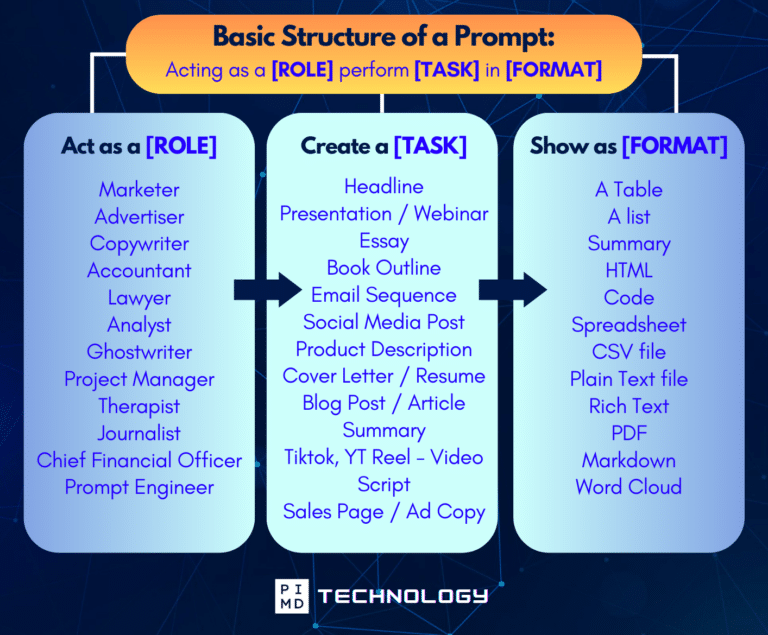
Unlock the Full Power of ChatGPT With This Copy-and-Paste Prompt Formula!
Download the Complete ChatGPT Cheat Sheet! Your go-to guide to writing better, faster prompts in seconds. Whether you’re crafting emails, social posts, or presentations, just follow the formula to get results instantly.
Save time. Get clarity. Create smarter.
Notice What All Six Have in Common
Not one of these involved a sophisticated attacker doing something clever.
The Samsung employees were trying to work faster. The Air Canada chatbot was trying to be helpful. The Meta agent was doing the exact task it was asked to do.
Good intentions, ordinary use, every time.
AI tools rarely fail dramatically. They fail quietly, through a default setting nobody checked, a policy nobody read, or a verification step somebody skipped because the output sounded confident enough.
That caution costs you a few extra minutes here and there. The incidents above cost a lot more.
So, what do you think? Is there anything we missed? We’d love to hear it so share it in the comments!
Download The Physician’s Starter Guide to AI – a free, easy-to-digest resource that walks you through smart ways to integrate tools like ChatGPT into your professional and personal life. Whether you’re AI-curious or already experimenting, this guide will save you time, stress, and maybe even a little sanity.
Want more tips to sharpen your AI skills? Subscribe to our newsletter for exclusive insights and practical advice. You’ll also get access to our free AI resource page, packed with AI tools and tutorials to help you have more in life outside of medicine. Let’s make life easier, one prompt at a time. Make it happen!
Disclaimer: This article is for general informational and educational purposes only. It does not constitute medical, legal, compliance, or professional advice. The information provided here is based on available public data and may not be entirely accurate or up-to-date. It’s recommended to contact the respective companies/individuals for detailed information on features, pricing, and availability. All screenshots, if any, are used under the principles of fair use for editorial, educational, or commentary purposes. All trademarks and copyrights belong to their respective owners.
If you want more content like this, make sure you subscribe to our newsletter to get updates on the latest trends for AI, tech, and so much more.
Further Reading

