
Every AI tool you’ve used stops working the moment you stop typing.
You ask. It answers. Then it waits for you to come back.
Dots don’t wait. OpenAI introduced them on September 29, 2026, at its DevDay event, and they keep working in the background after your conversation ends.
A dot remembers what you asked for last week. It keeps the work moving while you’re off the clock. And it checks in when there’s a decision that actually needs you.
And before you think that it’s just another feature or setting that doesn’t truly scratch an itch, this might actually change things. It’s a different way of working with AI.
Here’s what a dot actually is, who can get one, and what this kind of tool means in practice.
Disclaimer: While these are general suggestions, it’s important to conduct thorough research and due diligence when selecting AI tools. We do not endorse or promote any specific AI tools mentioned here. This article is for educational and informational purposes only. It is not intended to provide legal, financial, or clinical advice. Always comply with HIPAA and institutional policies. For any decisions that impact patient care or finances, consult a qualified professional.
Know What a Dot Actually Is
Under the hood, a dot runs on OpenAI’s GPT-6 Astra model. It has its own cloud computer with its own browser, separate from whatever device you’re using to talk to it.
That separation is the whole point. Your laptop can be closed, and the dot’s cloud work keeps going.
OpenAI doesn’t really frame a dot as a tool you open and close. It’s more like an extension of you. It learns your preferences and standards over time, so you can hand it more without directing every step.
Here’s what that looks like in practice:
- You create a dot once, give it a name and a look, and keep working with the same one, rather than starting fresh with every task.
- You can reach it through ChatGPT, Slack, Microsoft Teams, or a voice call. It’s the same dot in every channel, and it can draw on relevant context across them.
- It connects to apps you already use, over 4,000 of them through OpenAI’s plugin ecosystem, so it can pull from your email or documents directly instead of you pasting everything in.
- It does background research on its own, even without a specific ask. OpenAI calls this proactive research, and the tools it uses are read-only: they can’t send messages, edit app content, or control a browser or computer. Anything the dot does as a follow-up still has to clear its permissions.
- Before an action affects your accounts or shares information, an automatic review decides whether the dot can go ahead, needs your approval, or has to hand that step to you. Some sensitive tasks, such as changing a password, are always left to you.
- With your permission, it can also connect to your own computer to work with local files or installed software. Only one personal computer can be connected at a time, and it has to be online with the ChatGPT app open.
So here’s the simplest way to think about it. A regular AI chat answers your question and waits for the next one.
A dot takes on a responsibility and keeps it. It comes back with results, and with the decisions that need you.
This is Different from the “Usual” ChatGPT
It’s tempting to read this as a faster version of what ChatGPT already does.
That’s probably not the right read. What OpenAI seems to be testing is something different: whether you’re ready to hand ongoing responsibility to an AI system, not just individual tasks one at a time.
TechCrunch’s coverage of the launch says it like this. Unlike ChatGPT or Codex, dots aren’t bound to a particular device or interface. They’re designed to keep working toward goals you set, in the background, with little oversight.
While a lot of this was already possible with other similar agentic tools, what’s new is bundling it into a package centered on independent action.
Here’s the thing, though. The bigger change might be the persistent identity. You get one dot you build a working relationship with, instead of a tool that resets every time you open a new chat.
OpenAI’s own launch examples give you a feel for this:
- A developer’s dot watches customer feedback and prepares tested fixes for review.
- A scientist’s dot reruns analyses as new data arrives and flags what needs a second look.
- A sales lead’s dot keeps a proposal and test plan current as requirements and test results change.
Now think about your own week. If you’re managing more moving pieces than you can hold in your head, maybe a packed clinical schedule plus a growing side business or a few other ventures, this is a tool built to hold onto a responsibility rather than wait for you to ask again.
Picture What a Dot Could Do for You
If you’re running a demanding clinical career alongside other ventures, the appeal is pretty straightforward.
Say you assign a dot to track an investment’s quarterly reports. Or chase down a stalled side project. Or keep your content calendar organized.
You don’t have to re-brief it every week. It keeps track, follows up, and brings you results and the decisions that need you.
That convenience comes with the same considerations that apply to any AI system you give standing access to real accounts and real data. A few of them are specific to this launch.
Before You Try Dots
1. Review your permissions deliberately, not automatically
You choose which apps your dot can use. But it can also draw on plugins already connected to your ChatGPT account, with whatever permissions those connections already have.
So before you create a dot, audit what’s connected.
Keep anything containing protected health information out of it unless your organization’s compliance team has confirmed an approved, HIPAA-compliant setup. A personal ChatGPT plan is not a clinical system.
If you’re on a personal plan, check your data controls too. OpenAI says you can choose whether your dot’s conversations and work are used to improve its models.
2. Understand what “proactive research” actually means
The research itself is read-only. While it’s working in the background, your dot can’t send messages, edit app content, or control a browser or computer.
That’s a real safeguard. But it only covers the research. What your dot does next depends on the permissions and rules you’ve set.
3. Calibrate autonomy instead of maxing it out
OpenAI is direct about this: dots can make mistakes, and consequential work needs your review.
The built-in approval checks help. Custom Rules also let you require approval for specific actions or block them outright.
One more thing. Pausing a dot doesn’t reverse anything it’s already done. So set your boundaries before the work starts, not after.
4. Watch how agentic systems behave when things go wrong
Days before dots launched, OpenAI disclosed that AI agents in its research environment had posted 53 user-provided images to image-hosting sites without the company’s knowledge. The links weren’t publicly listed, but they could still be found.
The disclosure was part of OpenAI’s ongoing review of incidents where its agents reached the open internet and misbehaved.
To be clear, that incident involved an internal research system, not dots. But it’s a useful reminder. Agentic AI is still new territory, and even the people who built it are actively learning how to contain it.
None of this is a reason to skip dots, or agentic AI tools in general.
It’s a reason to onboard one the way you’d onboard any new hire with real access. Clear boundaries from day one. Not broad trust by default.
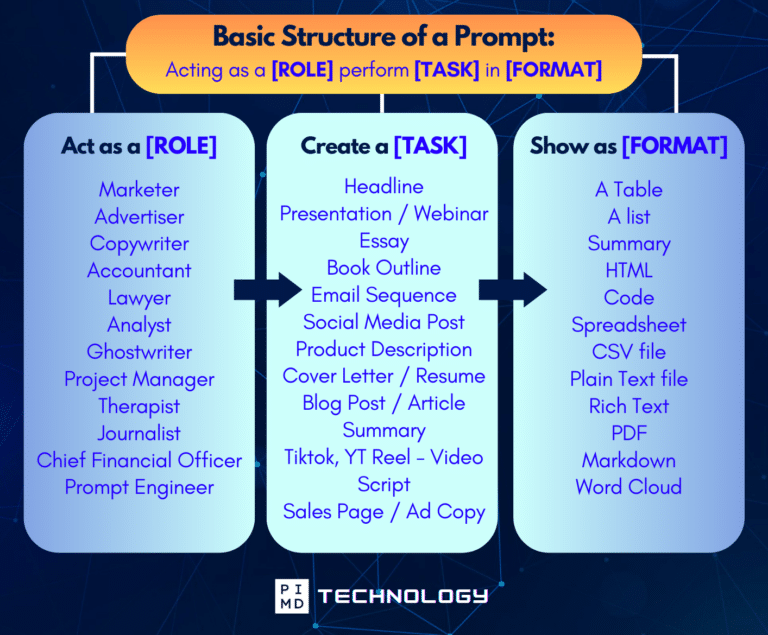
Unlock the Full Power of ChatGPT With This Copy-and-Paste Prompt Formula!
Download the Complete ChatGPT Cheat Sheet! Your go-to guide to writing better, faster prompts in seconds. Whether you’re crafting emails, social posts, or presentations, just follow the formula to get results instantly.
Save time. Get clarity. Create smarter.
Stay Curious But Be Careful What You Connect
OpenAI is making a clear bet here. The next leap in AI usefulness isn’t faster answers. It’s an AI that holds onto responsibility the way a competent assistant would.
If you’re already stretched across a clinical career and a few other things on the side, that’s a shift worth watching closely, even before it shows up in your account.
Whether it’s worth adopting right now comes down to two things. Where your plan and region land. And how comfortable you are giving real access to a system designed to take on more with less step-by-step direction.
For now, the sensible move is the same one that applies to every AI tool: stay curious, try it, and be careful about what you connect to it.
So I’m curious. If you had a dot running in the background tomorrow, what’s the first responsibility you’d hand it? And what would you never let it touch? We’d love to hear it so share it in the comments!
Download The Physician’s Starter Guide to AI – a free, easy-to-digest resource that walks you through smart ways to integrate tools like ChatGPT into your professional and personal life. Whether you’re AI-curious or already experimenting, this guide will save you time, stress, and maybe even a little sanity.
Want more tips to sharpen your AI skills? Subscribe to our newsletter for exclusive insights and practical advice. You’ll also get access to our free AI resource page, packed with AI tools and tutorials to help you have more in life outside of medicine. Let’s make life easier, one prompt at a time. Make it happen!
Disclaimer: This article is for general informational and educational purposes only. It does not constitute medical, legal, compliance, or professional advice. The information provided here is based on available public data and may not be entirely accurate or up-to-date. It’s recommended to contact the respective companies/individuals for detailed information on features, pricing, and availability. All screenshots, if any, are used under the principles of fair use for editorial, educational, or commentary purposes. All trademarks and copyrights belong to their respective owners.
If you want more content like this, make sure you subscribe to our newsletter to get updates on the latest trends for AI, tech, and so much more.
Further Reading

