
Imagine handing off a task, closing your laptop, and having the work continue without you.
That is what Grok Bot is built to do. It is an AI agent from xAI (also called SpaceXAI) that launched in beta on August 11, 2026. It is not the same as the Grok chatbot. It is a separate app with its own usage allowance.
This guide covers what it is, how it differs from a regular AI chat, what it can help physicians with, and what to check before trying it.
Disclaimer: While these are general suggestions, it’s important to conduct thorough research and due diligence when selecting AI tools. We do not endorse or promote any specific AI tools mentioned here. This article is for educational and informational purposes only. It is not intended to provide legal, financial, or clinical advice. Always comply with HIPAA and institutional policies. For any decisions that impact patient care or finances, consult a qualified professional.
What Grok Bot is
xAI describes Grok Bot as a team of always-on AI assistants. You create a “Bot” for each job, such as inbox management, expenses, or research. You message it like a coworker. It signs into your tools, does the work, and comes back when it needs your approval.
The basics:
- Bots can use a cloud computer, connected apps, websites, and files.
- Work continues in the background, even when your laptop or phone is closed.
- Apps are available for Mac, Windows, and Linux, with companion apps for iPhone and Android, according to the docs FAQ.
- It is in beta and updates often. The release notes list version 0.70.2 on October 11.
- Access comes through a paid Cursor plan or a linked SuperGrok subscription, with weekly usage included. The FAQ points to Cursor’s pricing page for current terms.
How it differs from a regular AI chat
A regular chat answers a question and waits. Grok Bot takes on a job and keeps going. A few things set it apart.
- It works in real apps. xAI says Bots can sign in and work inside tools and websites, including ones with no clean integration. Some sites may still block automation or show a CAPTCHA.
- It hands over sensitive steps. For passwords, two-factor codes, CAPTCHAs, and payment confirmations, the Bot is meant to give control back to you.
- Bots can work as a team. xAI describes a “chief of staff” Bot that passes work to specialist Bots for inbox, expenses, or bug fixes.
- It can learn your process. A feature called Teach a task lets a Bot watch one browser workflow and turn it into a draft skill that you review and test. The docs say the rollout may be gradual. Routines can then run on a schedule.
- It asks before it acts. Emails and Slack messages can be drafted for your review. The release notes also describe an approval check before actions that cannot be undone, such as sending, posting, buying, or deleting.
One detail to know: the launch post says each Bot has its own computer, but the docs say all Bots on an account share one cloud computer. That matters for security, covered below.
Why physicians should care
Grok Bot is built to take over repeat admin work, the kind that fills a day outside of patient care. xAI’s examples come from its own teams, but similar tasks show up in a physician’s week, in a practice’s back office, or in a side business.
Here is what it can help with:
- Inbox and follow-ups. A Bot can handle inbox tasks, draft replies for your approval, and follow up on threads that went quiet.
- Invoices and bookkeeping. xAI’s example is a Bot that processes invoices arriving in Gmail. The release notes list QuickBooks Online as a connector.
- Recurring reports. A routine can run on a schedule. xAI’s example is a Bot that keeps its CRM clean and posts a Monday scoreboard. The same idea could fit a weekly summary for a practice or a business.
- Research and outreach. xAI’s sales Bot researches accounts overnight and prepares personalized drafts to approve. That could apply to vendor research or partner outreach for a physician’s business.
- Slide decks. The release notes say Bots can build slide decks and deliver them as PowerPoint or Google Slides files.
All of these are business and admin tasks, not clinical ones. Results will vary, since xAI’s examples come from its own teams. Patient information is a separate question, covered next.
What to check before trying it
- Shared computer. All Bots on an account share one computer’s files, browser sessions, and logins. xAI’s security docs say not to use separate Bots as a security boundary. Anything you connect is reachable by every Bot.
- Data storage. The FAQ says Grok Bot requires cloud data storage and does not support Legacy Privacy Mode. It uses Cursor account and data settings, and training opt-out follows those settings.
- Patient information. xAI’s BAA request page is about its APIs. Nothing reviewed says Grok Bot is covered, so keep patient information out unless your organization confirms coverage in writing with xAI and its compliance team.
- Approval limits. An approval controls the proposed action. It does not undo work already done. The docs also say Auto Review is model-based and should complement, not replace, a least-privilege setup.
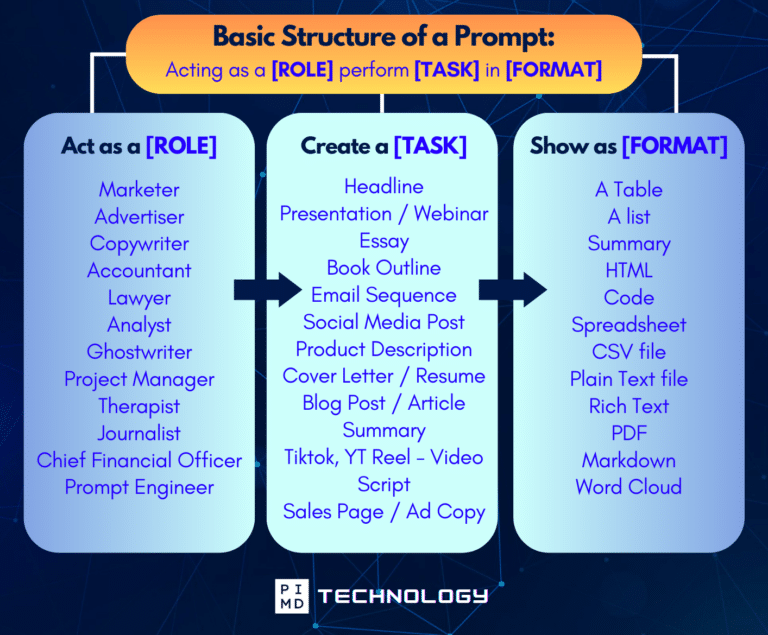
Unlock the Full Power of ChatGPT With This Copy-and-Paste Prompt Formula!
Download the Complete ChatGPT Cheat Sheet! Your go-to guide to writing better, faster prompts in seconds. Whether you’re crafting emails, social posts, or presentations, just follow the formula to get results instantly.
Save time. Get clarity. Create smarter.
How to start
xAI’s own advice is to connect only what a task needs, use limited-access accounts where possible, and start with read-only tasks and drafts. Sending, publishing, buying, and deleting should stay behind approval. Connected apps and routines should be reviewed regularly. A good first task is one where the worst outcome is a bad draft.
Grok Bot is an early look at AI that finishes tasks instead of only answering questions.
For physicians, the appeal is handing off repeat admin work. The tradeoff is giving an agent access to your accounts, so start small and keep patient data out.
Download The Physician’s Starter Guide to AI – a free, easy-to-digest resource that walks you through smart ways to integrate tools like ChatGPT into your professional and personal life. Whether you’re AI-curious or already experimenting, this guide will save you time, stress, and maybe even a little sanity.
Want more tips to sharpen your AI skills? Subscribe to our newsletter for exclusive insights and practical advice. You’ll also get access to our free AI resource page, packed with AI tools and tutorials to help you have more in life outside of medicine. Let’s make life easier, one prompt at a time. Make it happen!
Disclaimer: This article is for general informational and educational purposes only. It does not constitute medical, legal, compliance, or professional advice. The information provided here is based on available public data and may not be entirely accurate or up-to-date. It’s recommended to contact the respective companies/individuals for detailed information on features, pricing, and availability. All screenshots, if any, are used under the principles of fair use for editorial, educational, or commentary purposes. All trademarks and copyrights belong to their respective owners.
If you want more content like this, make sure you subscribe to our newsletter to get updates on the latest trends for AI, tech, and so much more.
Further Reading

