
Tell me if this is you. Most of the time, you do not feel burned out from patient care itself. It is the constant stream of small, repetitive tasks surrounding it that slowly drains time and energy.
The inbox that never clears. Notes that need rewriting. Stuff you want to read but never get to. Messages that require thoughtful replies when you are already mentally spent.
Individually, these tasks seem minor. Together, they take hours each week.
So instead of letting it “be the norm” and allowing it to constantly consume you, why not make use of the smartest tools we have today?
And they are not just tools that give answers, but systems that help handle parts of the work for you. Less like a Google search and more like a… if you’re a fan of Iron Man, “Jarvis.”
These are often called AI agents.
Now, don’t jump into thinking it’s super complicated stuff. In practical terms, they can be as simple as creating structured, reusable workflows inside tools like ChatGPT. With the rapid release of recent ChatGPT features, these workflows are becoming easier to set up and reuse.
In this article, you will learn what AI agents actually are, how they show up inside ChatGPT today, and how to build simple, repeatable workflows that reduce your administrative load.
We have 3 step-by-step examples you can try out today. Let’s talk about it!
Disclaimer: While these are general suggestions, it’s important to conduct thorough research and due diligence when selecting AI tools. We do not endorse or promote any specific AI tools mentioned here. This article is for educational and informational purposes only. It is not intended to provide legal, financial, or clinical advice. Always comply with HIPAA and institutional policies. For any decisions that impact patient care or finances, consult a qualified professional.
1. What AI Agents Actually Are (In Practical Terms)
Most people use ChatGPT in a one-off way, which is also where many of the common mistakes when using ChatGPT start to show up. You open it, type a prompt, get a response, and move on.
That works, but it still requires you to restart the process every time.
AI agents introduce a small but meaningful shift.
Instead of thinking through the same task repeatedly, you define a structure once and reuse it whenever that task comes up.
Inside ChatGPT, this often looks like:
A simple way to understand it:
Regular use is reactive. You ask, it answers.
Agent-style use is structured. You define how it should think and respond ahead of time.
This does not replace your judgment. It reduces how often you need to organize the same type of work from scratch. If you’re just getting started, having a simple ChatGPT cheat sheet can make it easier to apply these workflows consistently.
2. Three Practical “Agent-Style” Workflows Using ChatGPT
These are simple systems you can set up once and reuse whenever needed.
Before diving in, it is important to set clear boundaries. AI can be helpful for administrative and informational tasks, but it should not be used for anything involving patient-specific medical decisions, protected health information, or clinical judgment.
There are clear lines physicians should not cross when using tools like ChatGPT, and understanding those limits is essential to using AI responsibly. If you want a deeper breakdown, here’s a helpful guide on what doctors should never do in ChatGPT.
With that in mind, focus on using the examples below for safe, practical, non-clinical workflows you can apply today.
1. Email Assistant GPT
If you regularly send similar types of emails, you can create a structured prompt or custom GPT that handles the format and tone consistently.
Instead of rewriting the same type of message each time, you trigger a system you already built.
How to set it up:
- In ChatGPT, go to “Explore GPTs” → “Create” (top right corner)
- The name can be “Email Assistant”, just write a short description of what the AI is about, and in the instructions section, paste the prompt below.
- Use this prompt:
Act as a professional communication assistant for a physician.
Your task is to draft a clear, concise, and professional email response based on the input provided.
Follow these guidelines:
- Maintain a [tone: e.g., friendly, neutral, formal, empathetic]
- Keep the message [length: e.g., brief, detailed]
- Ensure clarity and avoid unnecessary complexity
- Preserve the original intent of the message
Output the email in this format:
- Subject line (if applicable)
- Greeting
- Body (well-structured paragraphs)
- Closing
If needed, improve the structure and wording, but do not add information that was not implied.
Here is the message to respond to:
[PASTE MESSAGE OR BULLET POINTS HERE]
- Leave the rest for now (we can explore them later) and hit “Create”.
You stay in control of the final message, but the structure is handled for you each time.
2. Research and Summary GPT
Instead of deciding how to process information every time, you can standardize how you review content.
This is useful for general knowledge, industry updates, or long-form content that would otherwise take more time to process.
How to set it up:
- In ChatGPT, go to “Explore GPTs” → “Create”
- The name can be “Research Assistant”, just do the same thing earlier, and in the instructions section, paste the prompt below.
- Use this prompt:
Act as a research assistant helping a physician quickly understand new information.
Your task is to analyze the provided content and extract the most relevant insights.
Follow these guidelines:
- Focus on clarity and accuracy
- Avoid speculation beyond the provided content
- Highlight only what is useful and actionable
Output in this format:
- Summary (2–3 sentences)
- Key Points (5 bullet points)
- Practical Takeaways (2–3 bullet points)
- Optional: Areas that may require deeper review or verification
Adjust depth based on this preference: [quick overview / moderate detail / deep dive]
Here is the content:
[PASTE ARTICLE, TEXT, OR TOPIC HERE]
This creates a consistent intake system instead of approaching every piece of content differently.
3. Notes to Action GPT
Notes are easy to collect but harder to organize. A structured workflow can turn them into something usable.
Instead of rethinking how to process notes each time, you follow the same system. This works well for personal organization, planning, or non-clinical documentation.
As a reminder, avoid pasting any patient-identifiable information or protected health data into general AI tools. Keep this workflow limited to personal notes, ideas, or non-clinical content.
How to set it up:
- In ChatGPT, go to “Explore GPTs” → “Create”
- The name can be “Notes Assistant”, same thing again, just paste the prompt below.
- Use this prompt:
Act as an organizational assistant helping a physician turn raw notes into clear, actionable output.
Your task is to organize and structure the provided notes into something easy to review and act on.
Follow these guidelines:
- Keep language simple and direct
- Group related ideas logically
- Do not remove important context
Output in this format:
- Key Points (summarized bullets)
- Action Items (clear, specific tasks)
- Next Steps (prioritized, if possible)
- Optional: Open Questions or unclear areas
Adjust structure based on this use case: [personal notes / personal ideas / project planning]
Here are the notes:
[PASTE NOTES HERE]
Over time, this becomes a reliable system for turning scattered thoughts into structured output.
A simple rule to keep in mind:
If you are repeating the same type of task multiple times per week, you can likely turn it into a reusable workflow.
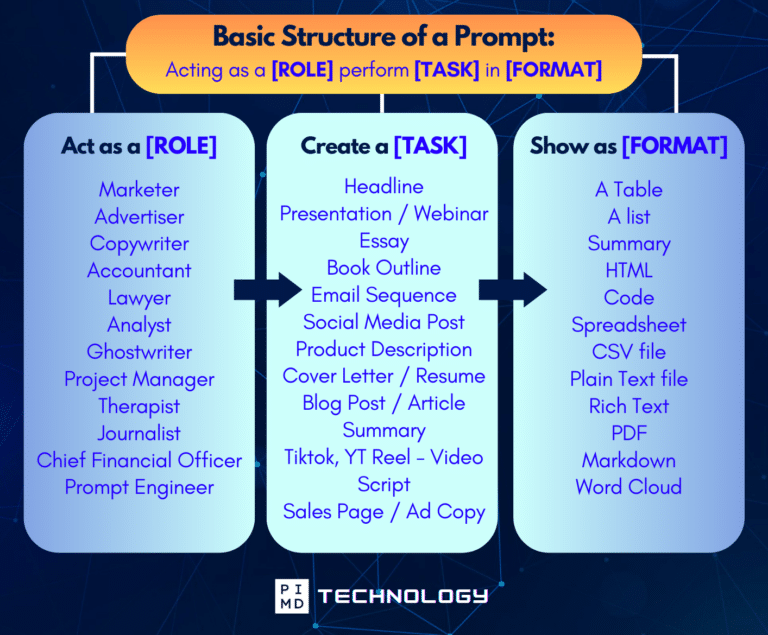
Unlock the Full Power of ChatGPT With This Copy-and-Paste Prompt Formula!
Download the Complete ChatGPT Cheat Sheet! Your go-to guide to writing better, faster prompts in seconds. Whether you’re crafting emails, social posts, or presentations, just follow the formula to get results instantly.
Save time. Get clarity. Create smarter.
3. How to Start Without Overcomplicating It
You do not need advanced tools to start seeing benefits. Start with one small system.
- Step 1: Choose one repetitive, non-clinical task
Emails, summaries, or notes are good starting points. - Step 2: Use or create a structured prompt
This becomes your repeatable workflow. - Step 3: Save it somewhere accessible
So you are not rewriting it each time. - Step 4: Review every output
AI can miss nuance. Treat it as a draft assistant. - Step 5: Avoid sensitive or patient-identifiable data
Use these workflows only for appropriate, non-confidential use cases.
The goal is not to automate everything. It is to reduce friction in one area at a time.
Final Thoughts
You know… for years we’ve been told to “work smarter, not harder,” but now it feels like that idea just got real… like really real.
These AI agents are real, and they’re already here (whether we use them or not), ready to take things off your plate, especially the repetitive admin stuff that drains your energy. And the interesting part? The people who benefit the most won’t be the ones who resist it… It’ll be the ones who learn to use it early and intentionally.
So maybe the question isn’t, “Will AI replace what I do?” but rather, “How can I leverage this to free up my time for what actually matters?” Because at the end of the day, it’s not about doing more… it’s about doing more of the right things.
So… are you going to watch this shift happen, or be part of it?
Start with one workflow. Keep it simple. Use it consistently. The real benefit comes from building consistent usage habits over time rather than using it occasionally.
Because over time, those small systems can quietly give you back hours each week.
Download The Physician’s Starter Guide to AI – a free, easy-to-digest resource that walks you through smart ways to integrate tools like ChatGPT into your professional and personal life. Whether you’re AI-curious or already experimenting, this guide will save you time, stress, and maybe even a little sanity.
Want more tips to sharpen your AI skills? Subscribe to our newsletter for exclusive insights and practical advice. You’ll also get access to our free AI resource page, packed with AI tools and tutorials to help you have more in life outside of medicine. Let’s make life easier, one prompt at a time. Make it happen!
Disclaimer: The information provided here is based on available public data and may not be entirely accurate or up-to-date. It’s recommended to contact the respective companies/individuals for detailed information on features, pricing, and availability. All screenshots are used under the principles of fair use for editorial, educational, or commentary purposes. All trademarks and copyrights belong to their respective owners.
If you want more content like this, make sure you subscribe to our newsletter to get updates on the latest trends for AI, tech, and so much more.
Further Reading

