
You know how it feels like there’s never enough time in the day, right?
But what if I told you there’s a way to reclaim some of it? Imagine AI tools that could save you hours every week, all with a simple installation. No tech jargon, no complicated setup, just tools that work right out of the box.
Just install it, and then it runs in the background. THAT easy.
Yes, AI doesn’t need to be complicated; some of the best tools are designed to simplify your day and reduce burnout. For busy physicians, these AI-driven extensions are the secret to getting more done without the stress.
Let’s explore some of the top AI tools that’ll streamline your tasks, save time, and help you focus on what truly matters.
Disclaimer: While these are general suggestions, it’s important to conduct thorough research and due diligence when selecting AI tools. We do not endorse or promote any specific AI tools mentioned here. This article is for educational and informational purposes only. It is not intended to provide legal, financial, or clinical advice. Always comply with HIPAA and institutional policies. For any decisions that impact patient care or finances, consult a qualified professional.
1. Monica: Your AI Assistant, Always by Your Side
First up, we’ve got Monica, an AI-powered assistant that integrates directly into your browser. The beauty of Monica is that it helps you streamline your online workflow. Whether that’s summarizing articles, rewriting text, or generating quick responses, there is no more switching between tabs or apps.
Monica works right in your browser, making it super simple to stay on task.
How Monica Helps:
- Summarizes long content from medical websites or journal articles.
- Helps you rewrite emails to be clearer or more concise.
- Generates quick responses to messages, saving you time on drafting emails from scratch.
- Turns rough notes into structured outlines for reports or meetings.
How to Install Monica:
- Open Google Chrome and go to the Chrome Web Store.
- Search for “Monica AI extension” and click Add to Chrome.
- Pin the extension to your toolbar for easy access.
How to Use Monica:
Once installed, highlight any text while browsing and ask Monica to summarize it. You can also paste an email draft and ask Monica to rewrite it more clearly or concisely. It’s an all-in-one assistant for handling everything from quick notes to complex articles.
2. Grammarly: Writing Made Easy and Efficient
Next up is Grammarly, the AI-powered writing assistant that helps you write clearly and professionally. Whether you’re drafting an email, writing a report, or documenting patient notes. Grammarly checks your grammar, suggests improvements to clarity, and even adjusts your tone to ensure your message is effective.
Pro tip: This tool is exceptionally good as a starter to enable AI in your team. It’s super simple!
How Grammarly Helps:
- Corrects grammar and spelling errors automatically.
- Suggests sentence rewrites to improve clarity and readability.
- Adjusts tone to fit your needs, whether it’s professional, friendly, or casual.
- Reduces the back-and-forth in editing by offering immediate suggestions.
To get started, search for “Grammarly for Chrome” in the Web Store and click Add to Chrome. Once it’s installed, Grammarly will automatically work in any text field you use in your browser. This is especially useful for your side business, like when writing professional letters or emails.
How to Install Grammarly:
- Open Google Chrome.
- Go to the Chrome Web Store.
- Search for “Grammarly for Chrome”.
- Click Add to Chrome.
- Create or log into your Grammarly account.
How to Use Grammarly:
Once it’s installed, Grammarly will automatically work in any text field you use in your browser. Whether you’re composing an email to a colleague or writing patient notes, Grammarly is there to help with real-time suggestions.
3. Sider: A Fast and Simple Way to Digest Long Content
Most of the time, you need to read a lot of information, but you just don’t have the time to wade through lengthy articles or reports. Thankfully, there’s Sider. This AI-powered sidebar extension helps you get to the main points of long documents or web pages quickly, allowing you to get to the key points faster.
How Sider Helps:
- Summarizes long articles into key bullet points, cutting down on reading time.
- Explains complex sections of text in simple terms.
- Compares multiple sources side by side, which is helpful for reviewing research or guidelines.
- Generates quick notes from the content you’re reading, making it easier to retain key information.
For busy physicians, Sider is perfect for staying on top of new research without getting bogged down in the details. Just let Sider pull out the essentials, and you’ll save time without missing out on important information.
How to Install Sider:
- Open Google Chrome.
- Go to the Chrome Web Store.
- Search for “Sider AI”.
- Click Add to Chrome.
- Pin the extension to your toolbar for easy access.
How to Use Sider:
Once installed, click on the Sider icon to open the sidebar while you’re reading an article or report. You can highlight text and ask Sider to summarize it or explain complex sections. It will break down the key points for you, allowing you to move on quickly.
For busy physicians, Sider is perfect for staying on top of new research or reviewing lengthy articles without getting bogged down in the details. Just let Sider pull out the essentials, and you’ll save time without missing out on important information.
Important Safety Note: Due Diligence is Key
While AI browser extensions like Monica, Grammarly, and Sider can save you tons of time, it’s essential to use them responsibly. Some malicious AI extensions may be designed to steal data, including sensitive information like login credentials, emails, and other personal details.
To ensure your safety, always:
- Install extensions from trusted sources, like the Chrome Web Store.
- Read reviews and check ratings before installing any extension.
- Review permissions that extensions ask for. Be cautious if they ask for more than necessary.
- Avoid using AI extensions for sensitive or personal information unless they’re approved for secure, compliant environments (e.g., if they’re HIPAA-compliant).
By taking a few extra seconds to verify the legitimacy of the extension, you can enjoy the time-saving benefits while keeping your data safe.
If you want to learn more about safe AI use, we wrote more about it in our article: How Physicians Can Spot Bad AI Tools Before They Cause Damage. Check it out!
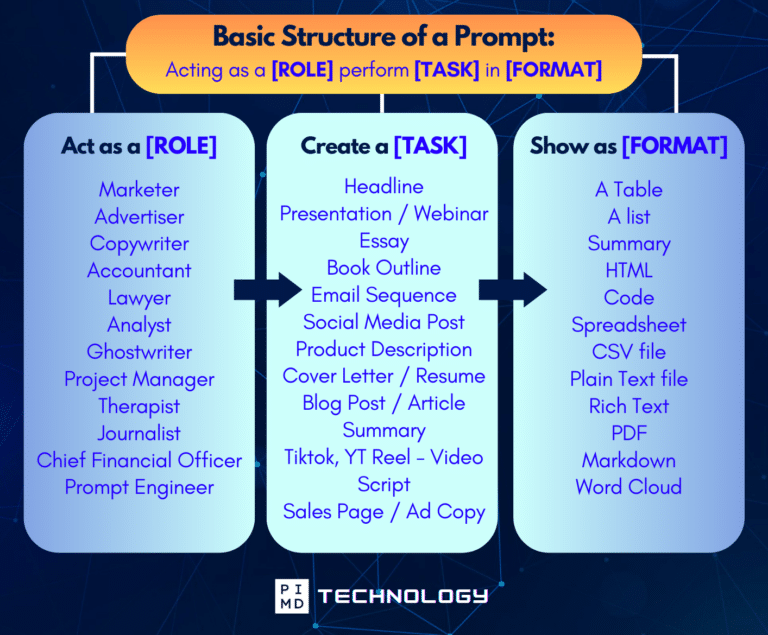
Unlock the Full Power of ChatGPT With This Copy-and-Paste Prompt Formula!
Download the Complete ChatGPT Cheat Sheet! Your go-to guide to writing better, faster prompts in seconds. Whether you’re crafting emails, social posts, or presentations, just follow the formula to get results instantly.
Save time. Get clarity. Create smarter.
Small Changes, Big Results
As physicians, we’re often running on a tight schedule, and there’s little room for inefficiency. The great thing about these AI extensions (Monica, Grammarly, and Sider) is that they’re easy to use and help you reclaim time throughout your day.
These tools work in the background, so you can focus on what you really want. Your family, your practice, and maybe even a bit of personal time freedom.
It might seem like small changes won’t add up to much, but trust me, those minutes stack up. Over time, you’ll uncover hidden hours in your week.
Here’s the thing: it’s not about working harder, but working smarter. These AI tools help you do just that. Give them a shot, and soon enough, you’ll thank yourself for installing them.
You’ve got this. Let AI handle the busy work while you focus on what you do best. And hey, take that coffee break, you’ve earned it.
Download The Physician’s Starter Guide to AI – a free, easy-to-digest resource that walks you through smart ways to integrate tools like ChatGPT into your professional and personal life. Whether you’re AI-curious or already experimenting, this guide will save you time, stress, and maybe even a little sanity.
Want more tips to sharpen your AI skills? Subscribe to our newsletter for exclusive insights and practical advice. You’ll also get access to our free AI resource page, packed with AI tools and tutorials to help you have more in life outside of medicine. Let’s make life easier, one prompt at a time. Make it happen!
Disclaimer: The information provided here is based on available public data and may not be entirely accurate or up-to-date. It’s recommended to contact the respective companies/individuals for detailed information on features, pricing, and availability. All screenshots are used under the principles of fair use for editorial, educational, or commentary purposes. All trademarks and copyrights belong to their respective owners.
Images used in this article are for editorial and informational purposes only and are sourced from publicly available product pages and promotional materials provided by their respective companies. Microsoft Edge with Copilot images courtesy of Microsoft. Arc Browser images courtesy of The Browser Company. Brave Browser and Leo AI images courtesy of Brave Software, Inc. All product names, logos, and interface designs are trademarks or registered trademarks of their respective owners. No affiliation or endorsement is implied.
If you want more content like this, make sure you subscribe to our newsletter to get updates on the latest trends for AI, tech, and so much more.
Further Reading

