
Most of the conversation about AI in medicine focuses on chatbots that answer questions. But have you heard of Claude for Healthcare?
What Anthropic has quietly been building is something more specific: a set of structured, task-ready tools that connect to real clinical and administrative systems and handle the kind of work that consumes physician time without requiring physician judgment.
For physicians who have been waiting to see AI become actually useful in practice rather than just promising in theory, 2026 is worth paying attention to.
Disclaimer: While these are general suggestions, it’s important to conduct thorough research and due diligence when selecting AI tools. We do not endorse or promote any specific AI tools mentioned here. This article is for educational and informational purposes only. It is not intended to provide legal, financial, or clinical advice. Always comply with HIPAA and institutional policies. For any decisions that impact patient care or finances, consult a qualified professional.
What Is Claude, and What Are Skills?
Claude is an AI assistant built by Anthropic, a safety-focused AI research company. It can read documents, analyze data, reason through complex problems, and connect directly to external platforms and databases to do real work inside them.
The feature that makes Claude particularly useful for clinical and administrative workflows is what Anthropic calls Agent Skills.
Under the hood, a Skill is basically a folder Claude can pull up mid-task, instructions, sometimes a script or template, all built around one job. Think of it less like a plugin and more like a checklist a new hire would follow: Claude reads the relevant one on the fly, whether the job at hand is digging through biomedical literature, working a prior authorization, or sorting through a stack of patient messages.
Skills work across Claude.ai on the web, the Claude desktop app, and Claude Code. They are not plugins in the traditional sense. They are task-specific expertise packages that transform Claude from a general-purpose assistant into a tool calibrated for a specific type of work.
In January 2026, Anthropic launched Claude for Healthcare at the J.P. Morgan Healthcare Conference, introducing a HIPAA-ready product with purpose-built connectors and agent skills for healthcare providers, payers, and health tech organizations. These are not generic AI features rebadged for medicine. They are built specifically for clinical and administrative workflows.
One important distinction before getting into the skills: the HIPAA-ready infrastructure and most of the healthcare-specific connectors and agent skills described below are part of Claude for Healthcare for enterprise customers, which requires a Business Associate Agreement (BAA) with Anthropic. Consumer plans such as Pro and Max are not covered under Anthropic’s BAA and are not intended for workflows that involve protected health information. Physicians evaluating Claude for clinical use should confirm the appropriate plan and compliance setup with their organization’s IT and legal teams before proceeding. Anthropic’s contact page is the right starting point for enterprise inquiries.
With that framing in place, here are five skills worth knowing about.
1. PubMed Literature Search
Claude for Healthcare also plugs into PubMed’s index (more than 35 million biomedical articles) so Claude can pull current research directly and help put together literature reviews grounded in that database rather than in whatever it happened to learn during training.
In practice, a physician can ask Claude to find recent evidence on a drug interaction, a treatment protocol update, or a clinical question they encounter rarely, and Claude pulls from a verified, indexed database rather than generating a summary from training data alone. The hallucination risk drops significantly when the model is pulling from an authoritative source rather than relying on memory.
For rapid literature checks between patients, preparing for complex cases, or staying current in a specialty adjacent to one’s own, this is one of the most defensible AI use cases available right now.
Where to get it: Available to enterprise customers through Claude for Healthcare. Once a BAA is in place, the connector is enabled at the workspace level via claude.ai/settings/connectors.
2. Prior Authorization Review
Prior authorization requests require pulling coverage requirements from payer policies, checking against clinical guidelines, cross-referencing patient records, and assembling documentation that justifies a treatment decision the physician has already made on clinical grounds.
It is time-consuming, fragmented, and does not require the physician’s clinical expertise to execute.
Anthropic built a customizable template for this exact workflow. Organizations adapt it to their own payer policies and internal review habits, and it’s designed to handle the cross-referencing that used to eat up staff time. Matching coverage rules, clinical guidelines, chart data, and appeal paperwork against each other. In a HIPAA-ready setup, Claude checks a patient’s clinical details against the relevant coverage criteria, then drafts a proposed determination with supporting documentation attached, ready for a human reviewer to sign off on.
The physician still reviews and approves every determination. The skill handles the assembly and cross-referencing work that currently takes hours manually.
Where to get it: Available as a customizable agent skill for enterprise customers through Claude for Healthcare. Contact Anthropic’s sales team at anthropic.com/contact-sales to discuss deployment.
3. Patient Message Triage
Patient portal inbox management is one of the less-discussed drivers of physician after-hours work. Messages come in at all hours, ranging from genuine urgency to routine refill requests. All of them require reading before anyone can identify the category.
For care teams drowning in patient portal messages, referrals, and handoffs, this gives them a way to work through the pile without reading every message cold. It can sort through these to identify what needs immediate attention, and to ensure that nothing gets inadvertently forgotten.
The triage skill does not respond to patients directly. It reads, categorizes, and flags by urgency, which is the cognitive work that has to happen before any response can go out. A care team then reviews a sorted inbox rather than an unsorted one. The physician still handles the clinical judgment.
Where to get it: Available for enterprise customers through Claude for Healthcare as part of the care coordination tools.
4. CMS Coverage Database Access
Claude can tap into the CMS Coverage Database directly (both Local and National Coverage Determinations) so it’s checking against the actual, locally-applicable coverage rules rather than a general sense of what Medicare typically covers. That’s what makes it useful for prior authorization checks and for building a claims appeal that actually holds up.
In practice, a physician or billing staff member can ask Claude whether a specific procedure is covered under Medicare for a given patient population, get a locally-accurate answer drawn from CMS’s own published determinations, and use that to inform billing decisions before they become denials. This connector sits alongside ICD-10 code lookup and National Provider Identifier Registry access in the same settings panel.
Where to get it: Available as a connector for enterprise customers through Claude for Healthcare. Enabled via claude.ai/settings/connectors once the enterprise workspace is configured.
5. Medical Reasoning and Calculation Support
This one is different from the four above. It is not a named skill or connector. It is Claude’s built-in reasoning capability applied to clinical calculations, scoring tools, and medical formulas.
Anthropic evaluated Claude Opus 4.5 on MedCalc, a medical calculation accuracy benchmark, as part of the Claude for Healthcare launch data published in January 2026. The model’s performance on this benchmark was reported by Anthropic as a meaningful improvement over prior versions, using Python code execution to verify numerical outputs.
A physician can ask Claude to walk through a GFR estimate, a CHADS2-VASc score, a Centor score, a Framingham risk calculation, or a dosing adjustment for renal impairment. Claude can perform the calculation and explain the clinical logic behind it in plain terms.
This differs from a standalone calculator like MDCalc in one specific way: the ability to ask not just for the result but for the reasoning, edge cases, or documentation language around it. That is useful for teaching, second-checking an unfamiliar formula, or drafting a clinical note that explains a decision.
One important note from Anthropic’s own support documentation: complex or mission-critical calculations should always be verified using specialized tools or manual methods. Claude’s reasoning ability does not replace clinical verification. It is a thinking aid, not a source of record.
Because this capability is built into Claude itself and requires no connector setup, any physician curious about it can try it directly at claude.ai without any institutional setup.
Where to get it: Available to any Claude user at claude.ai, including the free tier. No connector or enterprise setup required. For higher usage limits and access to more capable models, a Pro or Max plan is recommended.
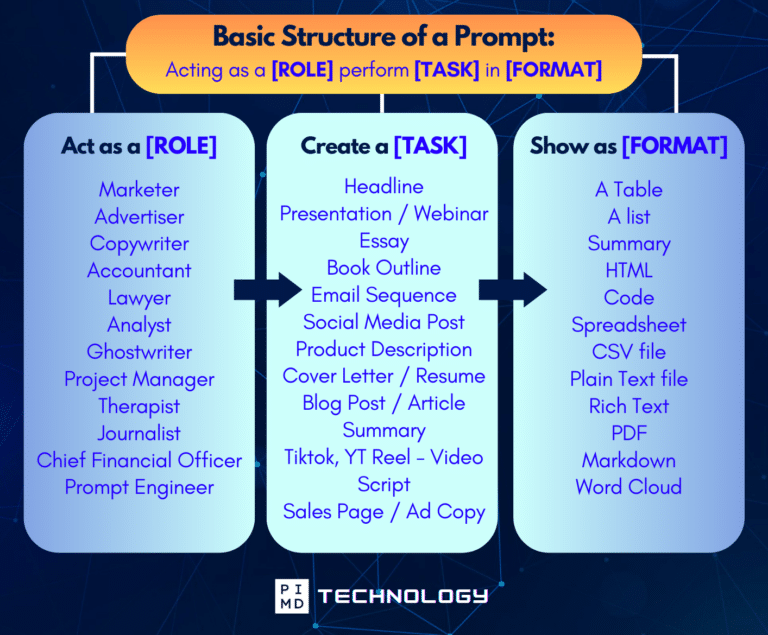
Unlock the Full Power of ChatGPT With This Copy-and-Paste Prompt Formula!
Download the Complete ChatGPT Cheat Sheet! Your go-to guide to writing better, faster prompts in seconds. Whether you’re crafting emails, social posts, or presentations, just follow the formula to get results instantly.
Save time. Get clarity. Create smarter.
How to Set Up Claude Skills and Connectors: Step by Step
Setup works differently depending on whether the use case is individual or organizational.
For Individual Use (Claude.ai, any plan)
- Go to claude.ai and sign in or create an account.
- In the left sidebar, look for the profile or account icon at the bottom left corner. Click it and select Settings, or navigate directly to claude.ai/settings.
- From Settings, select the Connectors tab, or go directly to claude.ai/settings/connectors.
- Browse the available connectors. Free and paid individual users can connect general-purpose tools available in the directory.
- Click Connect next to any connector and follow the authentication steps. Most take under two minutes.
- Return to the chat interface. Claude will now use the connected platform when relevant to a conversation.
For medical calculation and reasoning tasks, no connector is needed. Open any conversation and ask Claude to walk through a scoring tool, clinical formula, or calculation directly.
For Organizations and Practices (Claude for Healthcare Enterprise)
- Visit claude.com/solutions/healthcare to review what the enterprise tier includes.
- Contact Anthropic’s sales team via anthropic.com/contact-sales to discuss a Business Associate Agreement, pricing, and compliance setup. This step is required before any protected health information is involved.
- Once the BAA is in place, the organization’s IT or operations lead configures the Claude for Enterprise workspace through the Claude developer platform.
- Healthcare connectors including PubMed, CMS Coverage Database, ICD-10 codes, and National Provider Identifier Registry are then enabled at the workspace level through claude.ai/settings/connectors.
- Agent skills such as prior authorization review and patient message triage are deployed through Settings then Capabilities then Skills, with customization options to align each skill to the organization’s specific policies and workflows.
- Physicians and staff access Claude through the shared workspace. The connectors and skills are active across sessions without requiring individual configuration from each user.
For anyone managing the technical setup, Anthropic’s Agent Skills overview explains how skills are triggered, what customization looks like, and how skills interact with connectors.
What These Skills Are Not
To be perfectly clear, none of these tools are diagnostic AI.
They do not replace clinical judgment, and Anthropic has been consistent in framing the design intent as supporting physicians rather than substituting for them.
The prior authorization skill proposes a determination for physician review. The triage skill sorts messages for a care team to act on. The PubMed connector surfaces research for a physician to evaluate. The medical reasoning capability is a thinking aid that requires physician verification.
That is exactly the point. The skills described here are useful because they handle the work that has been pulling physicians away from the parts of medicine that actually require them. Getting the compliance setup right before using any of these tools in a clinical environment is the necessary first step, and Anthropic’s sales and support teams are the right contact for that conversation.
For physicians who have spent years watching AI promise more than it delivers, these tools are a reasonable place to look again. The starting point is low friction. The potential payoff in recovered time and reduced administrative overhead is real. And unlike a lot of what gets written about AI in medicine, these are tools a physician can actually try today.
But what about you? What do you think of Claude and these skills? Let us know in the comments!
At Passive Income MD, we cover the tools, strategies, and practical AI workflow tips helping physicians build more time and financial freedom. We’ll keep tracking where AI goes from here.
Download The Physician’s Starter Guide to AI – a free, easy-to-digest resource that walks you through smart ways to integrate tools like ChatGPT into your professional and personal life. Whether you’re AI-curious or already experimenting, this guide will save you time, stress, and maybe even a little sanity.
Want more tips to sharpen your AI skills? Subscribe to our newsletter for exclusive insights and practical advice. You’ll also get access to our free AI resource page, packed with AI tools and tutorials to help you have more in life outside of medicine. Let’s make life easier, one prompt at a time. Make it happen!
Disclaimer: This article is for general informational and educational purposes only. It does not constitute medical, legal, compliance, or professional advice. Claude for Healthcare features and pricing are subject to change. HIPAA compliance requirements are the responsibility of the deploying organization. Physicians and organizations should verify compliance requirements with qualified legal and IT professionals and consult Anthropic’s official documentation before implementation.
The information provided here is based on available public data and may not be entirely accurate or up-to-date. It’s recommended to contact the respective companies/individuals for detailed information on features, pricing, and availability. All screenshots, if any, are used under the principles of fair use for editorial, educational, or commentary purposes. All trademarks and copyrights belong to their respective owners.
If you want more content like this, make sure you subscribe to our newsletter to get updates on the latest trends for AI, tech, and so much more.
Further Reading

