
If you use Claude, you’re probably re-explaining yourself every single time you open it.
Same background. Same tone preferences. Same formatting requests. Typed out fresh into every new conversation, over and over.
There’s a way around that, and it’s honestly pretty straightforward.
Claude has a feature called Skills. A skill is a saved instruction set. You teach Claude something once, and it remembers and applies it automatically the next time a similar task shows up. Instead of writing the same long prompt every time, you build the preference once and reuse it for good.
Here’s the part most people don’t expect: you don’t have to touch a file, a folder, or a line of code. You do the whole thing through conversation. You describe what you want, and Claude builds the skill for you.
Here are three that are simple, safe, and actually useful for the work you do every week.
Disclaimer: While these are general suggestions, it’s important to conduct thorough research and due diligence when selecting AI tools. We do not endorse or promote any specific AI tools mentioned here. This article is for educational and informational purposes only. It is not intended to provide legal, financial, or clinical advice. Always comply with HIPAA and institutional policies. For any decisions that impact patient care or finances, consult a qualified professional.
Know What a Skill Actually Is
Think about training a new assistant. The first week, you explain everything. How you like things to sound. What format you want. What matters and what doesn’t. After that, they just know.
A Claude Skill works the same way. It’s not a plugin and it’s not a separate app. It’s a description of how you want a certain kind of task handled, saved so Claude can spot the pattern and apply it without being told again.
Anthropic built a conversational way to create these, meant for exactly this kind of beginner use. You don’t need to write anything in a technical format. You say “Create a skill that does X,” and Claude builds it and tells you when it’s ready.
Set This Up Before You Start
Skills are available on Free, Pro, Max, Team, and Enterprise plans, but one setting has to be flipped first.
Click your Account name on the bottom right, go to Settings, then Capabilities, and turn on “Code execution and file creation.” Skills won’t run without it.
Then go to Customize, then Skills. That’s where everything you build lives, and where you toggle each one on and off. If you’re on Enterprise, an owner has to confirm that both Code execution and Skills are switched on at the organization level before any of this appears for you. On Team plans, it’s on by default.
How to use it?
Claude reads the descriptions of the skills you have turned on, matches them against what you’re asking for, and fires the right one on its own. You just describe your task normally.
Built a summarizing skill? Paste in a long document, say “summarize this,” and it usually goes.
When Claude misses it, name the skill directly. “Use my Quick Summary skill on this.” That’s the fix Anthropic points to when a skill isn’t firing, and a vague description is almost always the reason. Worth going back and sharpening it.
There is a slash menu, just not everywhere. In Claude Code, and in the Claude add-ins for Excel, PowerPoint, Word, and Outlook, you type / and pick a skill from the list. Handy if you spend your day in Word or Outlook.
In regular chat, you’re just asking for what you want.
Skill #1: Rewrite Anything in Your Voice
You’ve probably run into this one. You write a draft, a note to a colleague, something for your newsletter, a message to your team, and it comes out stiff. It doesn’t sound like you.
This fixes that permanently.
How to build it:
Open a new conversation and paste in a few things you’ve written that already sound right. A couple of old emails, a message, anything that reflects how you actually talk.
Then say something like:
“I want you to create a skill called ‘My Voice‘ that rewrites anything I paste into a style that matches these examples. Study the tone, sentence length, and word choices in what I’m about to share, and use that as the model. Here are some samples of my writing: [paste examples].”
Claude will ask you a couple of questions. How formal you want it, whether you use contractions, stuff like that. Then it builds the skill.
From there, you paste in a rough draft, say “run this through My Voice,” and get back something that sounds like you wrote it. No re-explaining your tone every time.
Use it for anything you write repeatedly. Internal notes, newsletter drafts, social captions, adjusted to whatever voice fits that context. Keep it to your own writing and generic templates, nothing with patient information in it. More on that below.
Skill #2: Summarize the Way You Want
Everybody condenses information differently. Maybe you want three bullets. Maybe you want a short paragraph with no headers. Maybe you want the bottom line first and the details after.
Right now you’re probably typing that preference out every single time. Build it once instead.
How to build it:
“Create a skill called ‘Quick Summary‘ that summarizes anything I give you in this exact format: a two-sentence overview first, then three to five bullet points of the most important details, and nothing else. Keep it under 150 words unless I ask for more detail.”
After that, you paste in an article, a long email thread, or a document, say “summarize this with Quick Summary,” and get the same format every time.
One thing to keep in mind. Treat any summary of factual material, especially clinical or scientific content, as a starting point you still need to verify. This skill controls format and structure. It doesn’t replace checking your sources.
Skill #3: Brainstorm With You, Not At You
You ask an AI for ideas and get back a flat list of ten generic suggestions with no depth to any of them. Sound familiar?
This one turns brainstorming into an actual back and forth.
How to build it:
“Create a skill called ‘Real Brainstorm‘ that, whenever I ask you to help me brainstorm something, doesn’t just give me a list. Ask me one or two clarifying questions first about what I’m actually trying to solve. Then give me three to five ideas, but for each one, briefly explain why it might work and what the downside or risk is. Push back if an idea seems weak instead of being agreeable about everything.”
Use it for naming a new offering, thinking through a scheduling change, working out how to handle a difficult conversation.
The value isn’t in how many ideas you get. It’s in getting an honest response instead of a shallow list.
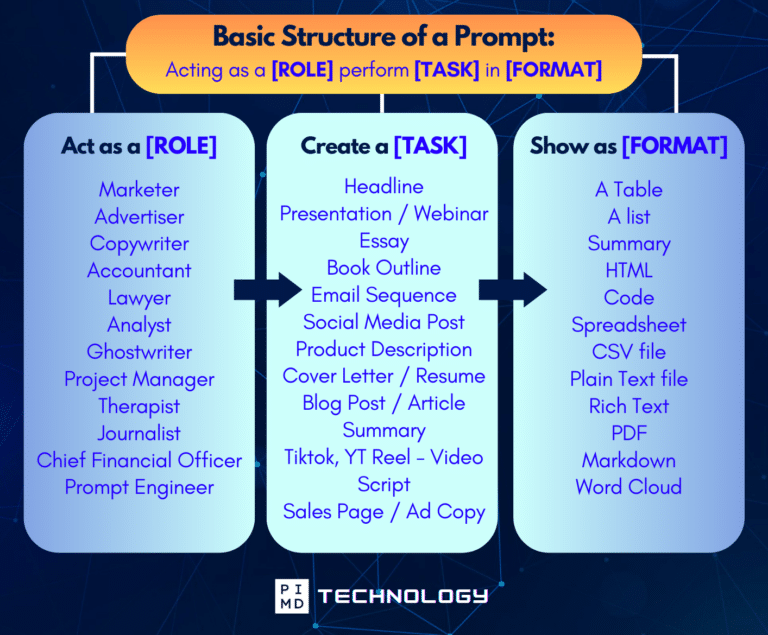
Unlock the Full Power of ChatGPT With This Copy-and-Paste Prompt Formula!
Download the Complete ChatGPT Cheat Sheet! Your go-to guide to writing better, faster prompts in seconds. Whether you’re crafting emails, social posts, or presentations, just follow the formula to get results instantly.
Save time. Get clarity. Create smarter.
Check These Things Before You Build Anything
None of these three skills require patient data, and that’s deliberate. They’re built around voice, formatting, and thinking, not clinical content, which means you can build and use all three without a compliance conversation.
That boundary only holds if you keep it. Claude’s Free, Pro, Max, and Team plans aren’t covered under Anthropic’s Business Associate Agreement, and PHI shouldn’t go into any AI tool without the right compliance setup in place. BAA coverage requires a HIPAA-ready Enterprise plan or the API. So don’t paste a real patient message into your voice skill to “make it sound better.”
Build the template, run the template through the skill, and fill in the specifics yourself afterward.
Also worth remembering: a skill is only as good as the examples and instructions you give it. If yours starts producing results that feel off, that’s an easy fix. Open a new conversation and say “adjust my [skill name] skill so it does X differently instead.” Claude will update it.
Give It Fifteen Minutes This Week
All three of these take about fifteen minutes total to build, and most of that is you digging up a few writing samples for the first one. There’s no technical setup involved. You just type into a normal Claude conversation.
The physicians getting the most out of AI right now usually aren’t the ones with the most complicated setups. They’re the ones who spent ten or fifteen minutes once building a few simple skills and have been reusing them ever since.
So what’s the one thing you keep re-explaining to Claude over and over? That’s your first skill. We’d love to hear what you build.
Download The Physician’s Starter Guide to AI – a free, easy-to-digest resource that walks you through smart ways to integrate tools like ChatGPT into your professional and personal life. Whether you’re AI-curious or already experimenting, this guide will save you time, stress, and maybe even a little sanity.
Want more tips to sharpen your AI skills? Subscribe to our newsletter for exclusive insights and practical advice. You’ll also get access to our free AI resource page, packed with AI tools and tutorials to help you have more in life outside of medicine. Let’s make life easier, one prompt at a time. Make it happen!
Disclaimer: This article is for general informational and educational purposes only. It does not constitute medical, legal, compliance, or professional advice. The information provided here is based on available public data and may not be entirely accurate or up-to-date. It’s recommended to contact the respective companies/individuals for detailed information on features, pricing, and availability. All screenshots, if any, are used under the principles of fair use for editorial, educational, or commentary purposes. All trademarks and copyrights belong to their respective owners.
If you want more content like this, make sure you subscribe to our newsletter to get updates on the latest trends for AI, tech, and so much more.
Further Reading

