
“Which AI should I be using?”
Honestly, a year ago I would have said just pick one and start. The gap didn’t matter that much. Now it does.
Both tools have gotten good enough that the question isn’t which one is smarter. It’s which one is better suited for what you’re actually trying to do. And the answer depends almost entirely on how you work.
Here’s a quick no-nonsense breakdown (scroll to the bottom for quick TL;DR).
Disclaimer: While these are general suggestions, it’s important to conduct thorough research and due diligence when selecting AI tools. We do not endorse or promote any specific AI tools mentioned here. This article is for educational and informational purposes only. It is not intended to provide legal, financial, or clinical advice. Always comply with HIPAA and institutional policies. For any decisions that impact patient care or finances, consult a qualified professional.
What ChatGPT Does Well
ChatGPT has built itself into something that feels less like a chat tool and more like a full workspace. The breadth is real.
Custom GPTs and saved assistants.
You can build a specialized version of ChatGPT around a task you repeat constantly. Reviewing contracts. Drafting patient education content. Generating social posts. Set it up once with your tone, your format, your instructions, and every time you open it, the context is already there. If you find yourself re-typing the same setup every time you open a new chat, Custom GPTs solve that problem directly.
Agent mode and deep research
This is where ChatGPT has gotten seriously useful for busy people. Agent mode lets ChatGPT operate more like a research assistant you can hand a task to and walk away from. Deep research can spend 5 to 30 minutes searching, reading, and synthesizing hundreds of sources before handing you a polished report. It’s not perfect, but for someone who used to spend a Saturday morning researching a real estate deal or a business decision, it’s a real time-saver.
Codex for software work
If you work with developers or are building something technical, Codex is ChatGPT’s cloud-based coding agent. It connects to your GitHub repo, reads your codebase, fixes bugs, writes features, and proposes pull requests. It works on multiple tasks in parallel. For the right use case, it’s genuinely impressive.
Image generation and editing
ChatGPT has native image creation built in. You can generate visuals from text, edit uploaded photos, adjust specific elements, and keep the rest of the image intact. If you need to go from written idea to visual asset inside the same tool, ChatGPT is the one that can do that right now.
Sora for video
This one’s worth mentioning because it’s actually different. ChatGPT has Sora built in for AI video generation. Not perfect, but if you’re experimenting with video content for marketing or social, it’s all inside the same subscription.
Spreadsheets and office tools
ChatGPT now connects natively to Excel and Google Sheets, letting you build, clean, update, and explain workbooks directly from a sidebar. For anyone managing financial tracking or data analysis, that integration matters.
The overall picture: ChatGPT has invested hard in making itself the tool you can stay inside all day. One subscription, many types of work.
What Claude Does Well
Claude’s edge isn’t about having more features. It’s about doing a specific category of work at a depth that’s hard to match.
Long-context performance that actually holds
Claude Opus 4.6 and Sonnet 4.6 support a 1 million token context window. That’s roughly 750,000 words in a single conversation. The question isn’t just whether the model can accept that much text, it’s whether it can still retrieve details from the beginning when you’re asking questions at the end. Benchmarks suggest Claude holds up better than most at that scale. In practice, that means you can paste in a full transcript, a dense policy document, a body of research, or a long meeting archive and Claude will track the details throughout.
For physicians working with long non-private documents, this is a meaningful practical difference.
Writing quality on the first pass
Claude tends to produce cleaner prose without as much cleanup. Not because ChatGPT writes badly, but Claude’s defaults feel more editorial. The tone stays consistent. Transitions work. The sentences read more like something a person actually wrote.
This matters most when you have the substance and need help with the expression. A rough draft that needs flow. A transcript that needs to become a readable article. A leadership email where the tone feels off. Claude handles that kind of work well.
Artifacts and interactive outputs
This is something Claude does that surprises a lot of people. Inside a conversation, Claude can produce working interactive outputs, not just text. Dashboards, charts, calculators, forms, structured reports that you can actually use and share with a team. You describe what you want, Claude builds a version, you refine it through conversation. These outputs stay in your project library for up to 90 days.
Diagrams and visual workflows
Claude can build flowcharts, process maps, and system diagrams from a plain language description. You don’t need a separate tool. You describe the workflow, Claude renders it. For anyone mapping out a business process, an investment decision tree, or a patient care pathway, this is useful. Right inside the chat. No Miro, no Lucidchart.
Claude Cowork
This is Anthropic’s answer to the “full workspace” idea, and it’s worth knowing about. Cowork lets you set up automated workflows, connect tools like Gmail, Google Calendar, Slack, and Zoom, and run tasks on a schedule without being in the chat. Think of it like having a digital operator that handles recurring work for you. Morning briefings pulled from your calendar and email. Content repurposing pipelines. Research updates on a schedule. It’s built for people who want to move from “asking Claude things” to “having Claude run things.”
Claude Code
Anthropic’s coding tool reads your codebase, edits files, runs commands, and handles multi-step programming work. Developers who work with large codebases, complex refactors, or code migration tend to reach for Claude Code specifically. If you’re building something technical or working closely with a developer, it’s worth knowing this option exists.
Claude Design
This launched in April 2026 as a research preview. It’s a visual creation tool where you describe what you need in plain language and Claude builds a first version: pitch decks, product mockups, prototypes, research summaries. You refine it through conversation. It’s not Canva or Figma, but for early-stage visual thinking, it removes a lot of friction.
Deep editorial review
Claude is good at critiquing, not just completing. Paste in a long draft and ask it what’s unclear, where it loses the reader, what sounds generic, what should be cut. The feedback is usually specific and actually useful. Not a list of vague suggestions, but real observations that change how you think about the piece.
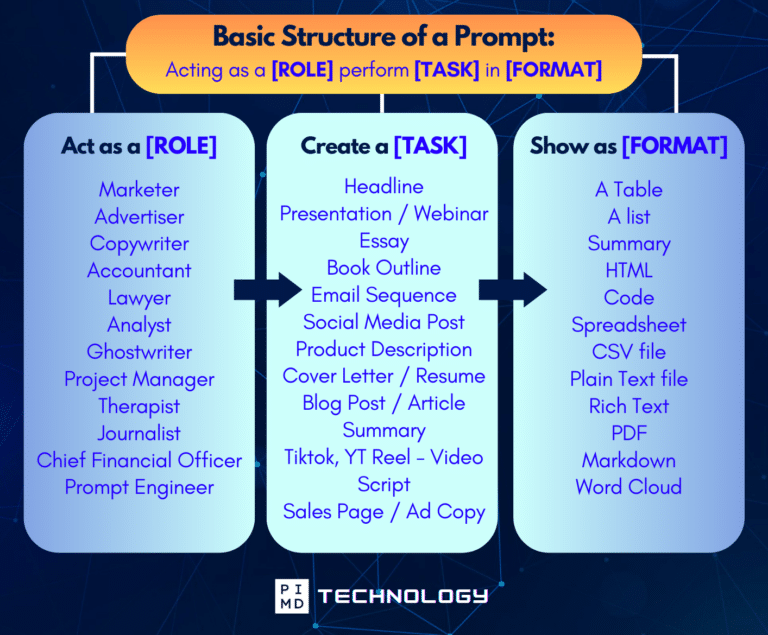
Unlock the Full Power of ChatGPT With This Copy-and-Paste Prompt Formula!
Download the Complete ChatGPT Cheat Sheet! Your go-to guide to writing better, faster prompts in seconds. Whether you’re crafting emails, social posts, or presentations, just follow the formula to get results instantly.
Save time. Get clarity. Create smarter.
TL;DR
ChatGPT gives you more breadth. Claude gives you more depth.
ChatGPT is stronger at multi-format workflows, image and video generation, spreadsheet integration, deep research, coding via Codex, and functioning as an all-in-one workspace.
Claude is stronger at long-form writing and editing, document review, transcript analysis, interactive artifacts, diagrams and workflows, automated task pipelines via Cowork, and sustained work with large amounts of text.
A Simple Way to Test This
Run the same task in both tools and compare honestly. Not which output sounds more impressive. Which one requires less editing. Which one understood the assignment. Which one sounds more like you.
Try this prompt in both:
“Act as a practical assistant for a busy professional. Take the notes below and turn them into a clear, useful draft. Show: 1. improved draft, 2. key takeaways, 3. what needs clarification, 4. suggested next steps. Notes: [paste your notes].”
The one that saves you more time is the right answer for your workflow.
One Quick Note on Privacy
This applies equally to both tools. Don’t paste private patient information into either ChatGPT or Claude unless you’re working inside an approved, HIPAA-compliant system. Use general, de-identified prompts. AI can help you think, write, and organize. It doesn’t replace professional judgment or compliance review.
Final Thoughts
If you want a single everyday AI workspace, ChatGPT is probably the better starting point. Custom assistants, image and video generation, deep research, spreadsheet integration, repeatable workflows. It does a lot, and it keeps adding more.
If the work is long, writing-heavy, or requires careful handling of complex text, Claude fits better. Improving drafts, reviewing large documents, turning transcripts into articles, building diagrams, running automated workflows through Cowork, or doing serious coding work.
If you use AI regularly, the most honest answer is probably both. Use ChatGPT to brainstorm and structure. Use Claude to make the final version sound like it was actually written by a person.
The question was never which AI is smarter. It was which one gets you closer to done.
So what are you using AI for right now? I’m genuinely curious what’s working and what isn’t. Let us know in the comments!
Download The Physician’s Starter Guide to AI – a free, easy-to-digest resource that walks you through smart ways to integrate tools like ChatGPT into your professional and personal life. Whether you’re AI-curious or already experimenting, this guide will save you time, stress, and maybe even a little sanity.
Want more tips to sharpen your AI skills? Subscribe to our newsletter for exclusive insights and practical advice. You’ll also get access to our free AI resource page, packed with AI tools and tutorials to help you have more in life outside of medicine. Let’s make life easier, one prompt at a time. Make it happen!
Disclaimer: The information provided here is based on available public data and may not be entirely accurate or up-to-date. It’s recommended to contact the respective companies/individuals for detailed information on features, pricing, and availability. All screenshots are used under the principles of fair use for editorial, educational, or commentary purposes. All trademarks and copyrights belong to their respective owners.
If you want more content like this, make sure you subscribe to our newsletter to get updates on the latest trends for AI, tech, and so much more.
Further Reading

