
Have you ever opened Claude, typed a question, read the answer, and closed the tab? Same. That’s basically using it like Google with extra steps.
Honestly, it works fine for quick stuff. But if that’s the only way you’re using it, you’re missing the part that actually saves you hours every week.
Here’s the thing. The real value isn’t in one good question. It’s in building a process you run the same way every time.
This is about one workflow specifically: using Claude as a research assistant. Not to replace your judgment. Not to replace primary sources. Just to handle the slow, scattered part of research that happens before the real thinking starts.
Disclaimer: While these are general suggestions, it’s important to conduct thorough research and due diligence when selecting AI tools. We do not endorse or promote any specific AI tools mentioned here. This article is for educational and informational purposes only. It is not intended to provide legal, financial, or clinical advice. Always comply with HIPAA and institutional policies. For any decisions that impact patient care or finances, consult a qualified professional.
Why This Isn’t Just Googling
A Google search hands you a list of links. Then you’re the one opening ten tabs, reading each one, deciding what matters, and stitching it together yourself.
Claude works differently. Give it a clear task and it can look at a question from a few angles, pull out what matters, tell you where the evidence is thin, and hand you something you can actually start working from.
But here’s the part you can’t skip. Claude isn’t a live database. It has a training cutoff, and it can be wrong.
If your work carries real stakes, and if you’re a physician, that’s most of what you do, treat anything factual Claude gives you as a starting point. Not an answer.
Every step below is built around that.
Before You Type Anything
Most AI research sessions go sideways for one reason. People start typing before they know what they need.
Vague question in, vague answer out. And a vague answer often feels useful even when it isn’t.
Before you open Claude, give yourself two or three minutes with these:
What’s the actual question here?
Not the topic. The question. “GLP-1 drugs” is a topic.
“What does the current evidence say about GLP-1 use in non-diabetic patients for weight management, and where are the gaps?” That’s a question.
What do you already know?
Tell Claude your starting point. If you’re already deep in a topic, say so. If it’s brand new to you, say that too.
What format actually helps you?
A summary? A list of claims to check? A comparison? Decide this up front and you skip a round of back and forth.
What happens if you get this wrong?
That answer tells you how much verification you’ll need at the end.
Casual curiosity needs less checking than something that’s going to touch a patient, an investment, or a legal decision. Three minutes on these four questions. Everything after gets faster.
Now, let’s get into how to actually build the workflow.
Step 1: Set Up a Project First
Claude.ai has a feature called Projects. It’s basically a dedicated space that keeps context across sessions, so you’re not re-explaining your situation every time you open a new chat.
If you’re researching something over multiple sessions, this alone is worth setting up.
Here’s how:
- Go to claude.ai and sign in.
- Click Projects in the sidebar, then New Project.
- Name it something specific. Not “Research.” Try “GLP-1 Evidence Review” or “Multifamily Market Q3 2026.” You’ll thank yourself later when you’re trying to find it again.
- Claude will ask what you’re trying to achieve in the project. Don’t skip this field.
For clinical work, something like this in the project description does the job:
“This project is for reviewing clinical literature on a specific topic before I consult primary sources. Claude will help me map the landscape, identify key claims, and flag where evidence is limited or contested. All outputs are preliminary and will be verified against PubMed, clinical guidelines, or peer-reviewed sources before any conclusions are drawn. No patient data will be entered here.”
That last line matters. It sets the boundary before you’ve even started.
For anything outside clinical work, this version works just as well:
“This project is for background research on [topic]. Claude will help me orient quickly, surface key considerations, and flag what needs further verification. Outputs are drafts for my own thinking, not finished conclusions.”
Doesn’t need to be long. It just needs to be honest about what you’re using it for.
Step 2: Write a Brief, Not a Question
This is the step almost everyone skips, and it’s the one that changes everything.
A question asks Claude to respond. A brief tells Claude how to respond.
A good brief has five pieces. You won’t need all five every time, but the more complicated the topic, the more each one matters.
- The actual question. Specific, not broad.
- The scope. What’s in, what’s out.
- The angle. What matters most for your purpose.
- The honesty ask. Tell Claude directly to flag uncertainty and anything that might be outdated.
- The format. How you want the answer structured.
Here’s a template you can adapt:
“I need a research overview on [topic]. Focus on [specific angle]. Limit scope to [time period, specialty, geography]. Where evidence is limited, contested, or possibly outdated, say so directly instead of filling the gap. Don’t cite specific studies unless you’re highly confident they exist and are described accurately. Format as: a 3-5 sentence overview, a numbered list of the most important points, and a section called ‘What to Verify’ listing what I should check against primary sources.”
If you’re a physician, something like this works:
“I need a research overview on low-dose naltrexone for fibromyalgia. Focus on peer-reviewed clinical evidence, not anecdotal reports. Limit to adult patients. Flag anything preliminary or based on small samples. Don’t fabricate citations. Format as: a 3-5 sentence overview, a numbered list of evidence-based points, and a ‘What to Verify’ section for PubMed or rheumatology guideline checks.”
If you’re not in clinical work, this version fits:
“I need a research overview on multifamily investing trends in the U.S. Southeast. Focus on cap rates and rental demand in 2025 and 2026. Flag anything that might be outdated or regionally inconsistent. Don’t present projections as facts. Format as: a short overview, key considerations as a numbered list, and a ‘What to Verify’ section for current market reports or an advisor conversation.”
Same structure both times. Same honesty ask. Same built-in verification step.
Step 3: Treat the Output Like a Map, Not a Manual
When Claude answers your brief, don’t treat it as finished.
Read it the way you’d read a first sketch, useful for orientation, not something you build on directly. Pay close attention to the What to Verify section. That’s your actual checklist.
For clinical questions, that means PubMed, specialty guidelines, or UpToDate.
For anything else, it means whatever source is actually authoritative in that field.
A few things worth asking as you read:
Does this sound too clean?
Real evidence is messier than a tidy AI summary. If something reads as fully settled with zero caveats, that’s your cue to check it.
Are there citations?
If you told Claude not to fabricate sources and specific studies still show up, verify those first. A citation you can’t find on PubMed didn’t happen.
Does it admit what it doesn’t know?
An answer with caveats is more trustworthy than one without. No caveats at all should make you more careful, not less.
Step 4: Save What Works
You’re probably researching the same categories of things over and over.
Once a brief format works well for one type of research, save it. Adapt it next time instead of starting from scratch.
Worth keeping templates for:
- Clinical literature reviews
- Evaluating an investment or business opportunity
- Understanding a regulation or legal question
- Competitive or market research
Same structure, calibrated for the stakes of each category. This is where the weekly time savings really start to add up.
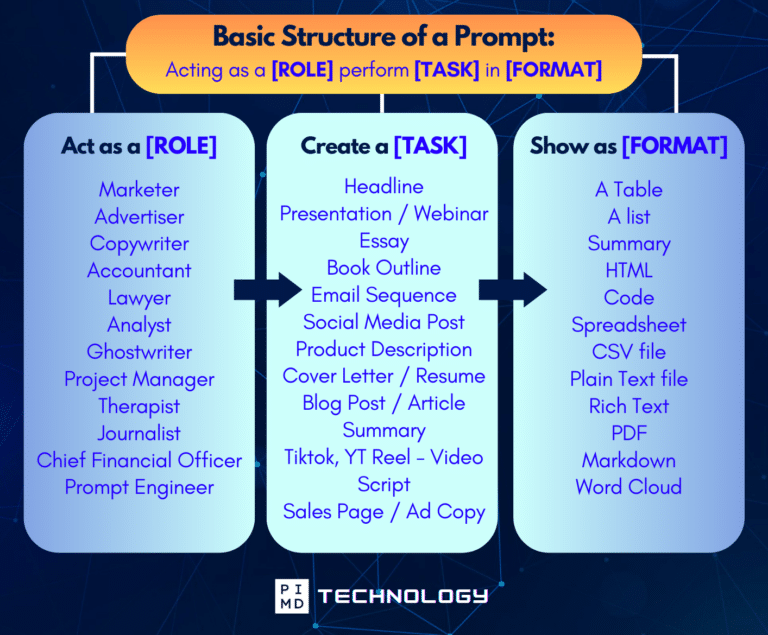
Unlock the Full Power of ChatGPT With This Copy-and-Paste Prompt Formula!
Download the Complete ChatGPT Cheat Sheet! Your go-to guide to writing better, faster prompts in seconds. Whether you’re crafting emails, social posts, or presentations, just follow the formula to get results instantly.
Save time. Get clarity. Create smarter.
Two Boundaries Worth Knowing
If you’re in a regulated field, these two matter.
1. Don’t put patient information into Claude on a consumer plan.
Claude Pro and Max aren’t covered under Anthropic’s Business Associate Agreement. Anything touching protected health information needs an enterprise setup with a BAA in place.
This workflow is built for general research, full stop.
2. Claude’s output isn’t professional advice.
For anything that’s going to inform a clinical decision, a legal matter, or a financial move, treat what Claude gives you as background.
The final call is yours, working from verified sources. That’s not a limitation. That’s the correct way to use it. As we always say, do your due diligence.
What You Actually Get Back
A research session using this process, on something moderately complex, takes about 20 to 30 minutes.
A few minutes to write the brief, a few to review the output, ten or fifteen to verify against real sources. The same session without any of this usually takes 60 to 90 minutes and leaves you with something less organized.
Do this two or three times a week, and that gap is about two to three hours back every week.
Over a month, that’s close to ten hours.
So if you find any value in this, pick something already on your research list this week. Write a brief using the template above. Compare it to what a plain Google search would’ve gotten you in the same amount of time.
This might be your first step towards optimized work with AI. Are you willing to try? Let us know in the comments.
Download The Physician’s Starter Guide to AI – a free, easy-to-digest resource that walks you through smart ways to integrate tools like ChatGPT into your professional and personal life. Whether you’re AI-curious or already experimenting, this guide will save you time, stress, and maybe even a little sanity.
Want more tips to sharpen your AI skills? Subscribe to our newsletter for exclusive insights and practical advice. You’ll also get access to our free AI resource page, packed with AI tools and tutorials to help you have more in life outside of medicine. Let’s make life easier, one prompt at a time. Make it happen!
Disclaimer: This article is for general informational and educational purposes only. It does not constitute medical, legal, compliance, or professional advice. The information provided here is based on available public data and may not be entirely accurate or up-to-date. It’s recommended to contact the respective companies/individuals for detailed information on features, pricing, and availability. All screenshots, if any, are used under the principles of fair use for editorial, educational, or commentary purposes. All trademarks and copyrights belong to their respective owners.
If you want more content like this, make sure you subscribe to our newsletter to get updates on the latest trends for AI, tech, and so much more.
Further Reading

