
Tell me if this sounds familiar.
You finish a full day of patients, you’ve got a clinical question in the back of your mind, and you know you should look it up. So you open PubMed. You get 300 results. You skim three abstracts, get pulled in two directions, and close the tab. You’ll get back to it later.
Later never comes.
I’ve been there more times than I can count. And honestly, the problem isn’t laziness or lack of curiosity. It’s just that reading and synthesizing research takes a specific kind of focused mental energy that most of us have already spent by 6pm.
Here’s the thing, though. AI can do the first pass for you.
Disclaimer: While these are general suggestions, it’s important to conduct thorough research and due diligence when selecting AI tools. We do not endorse or promote any specific AI tools mentioned here. This article is for educational and informational purposes only. It is not intended to provide legal, financial, or clinical advice. Always comply with HIPAA and institutional policies. For any decisions that impact patient care or finances, consult a qualified professional.
The Real Problem Isn’t Finding Information. It’s Processing It.
There’s no shortage of medical literature. There’s a shortage of time and bandwidth to actually absorb it.
What I’ve found is that ChatGPT works best not as a search engine, but as a processor. You point it at a topic, give it a clear structure to follow, and it hands you back a summary you can actually use. Not a list of links. Not 12 open tabs. A readable overview you can review in five minutes.
That shift, from searching to processing, is where most physicians are leaving time on the table.
One Prompt That Actually Works
I’m not gonna pretend there’s a magic formula here, but there is a structure that can consistently give a good output.
So go to ChatGPT, hit new chat, and pick the “thinking version”. If you don’t know how to do that, just click on the top-right dropdown after the word ChatGPT. Now, paste in this prompt:
Act as a clinical research assistant. Summarize the current evidence on: [TOPIC]. Format your response as: (1) key findings, (2) areas of agreement, (3) areas of conflicting evidence, (4) practical takeaways for physicians. Be concise and mention study types where relevant.
That’s it. One prompt, reusable forever. Just swap in the topic.
Just don’t forget to pin and rename the chat so you won’t forget it. Then each time, you’ll get a structured summary in under a minute that would have taken you 30 to 45 minutes to piece together manually.
Btw, don’t use it to make patient-specific decisions though. Use it to get oriented faster so you can focus on real thinking where it counts.
Take It a Step Further: Set It Up as a ChatGPT Project
The prompt above works on its own. But if you want this to actually stick as a habit rather than something you try once and forget about, setting it up as a dedicated Project in ChatGPT is worth the extra five minutes.
Here’s the difference. A regular ChatGPT conversation is basically a one-off. Every time you start a new chat, the AI has no memory of how you like information structured, what specialty you’re in, or what you’ve already asked it. You’re starting from scratch every time.
A Project changes that. You give it context once, it remembers. You come back a week later and it already knows you’re a physician who wants concise, clinically practical summaries. That consistency compounds over time. The outputs get better and more tailored the more you use it.
Pretty straightforward to set up. Here’s how:
- Open ChatGPT and look for “Projects” in the left sidebar.
It’s available on the paid (Plus or Team) plan (as of this writing). If you don’t see it, check that your account is updated. - Click “New Project” and give it a name.
Something simple like “My Research Assistant” works fine. - Open the project and go to “Project Instructions.”
This is where you give the AI its standing context. Think of it like a permanent system prompt that applies to every conversation inside this project. - Paste in your standing context.
Here’s a simple version to start with:
I’m a physician. When I ask you to summarize medical research, always structure your response as: (1) key findings, (2) areas of consensus, (3) conflicting evidence, (4) practical clinical takeaways. Be concise, clinically practical, and mention study types where relevant. Never make patient-specific clinical recommendations.
- Save it and start your first conversation inside the project.
From here on, every time you open this project and paste in a new topic, it already knows the format you want. - Bookmark or pin the project so it’s easy to find.
The goal is zero friction. If you have to hunt for it, you won’t use it.
That’s really it. You set this up once and you’re done.
The reason this matters is that one of the biggest barriers to using any new tool consistently isn’t the tool itself, it’s the friction of getting started each time. When your research assistant is already configured and one click away, it becomes the path of least resistance instead of another thing on the to-do list.
And over time, you can add to the project. Save summaries you’ve already generated. Build a running reference library on topics you care about. Use it as a place to think through clinical questions before you go looking for primary sources. It starts as a shortcut and slowly becomes something more useful than that.
Three Simple Ways to Make the Output Better
The base prompt already does a lot. But a few small tweaks go a long way.
Get more specific with your question. Broad topics give you broad summaries. “Diabetes treatment” is too wide. “SGLT2 inhibitors in heart failure outcomes” gives you something actually useful.
Ask for study types. Adding “mention the type of studies supporting each conclusion” helps you judge how solid the evidence base actually is. Randomized controlled trials and retrospective observational studies are not the same thing, and you already know that.
Ask it to simplify when needed. If the output is too dense after a long shift, just add: “Explain this in a way that’s clinically practical and easy to scan.” Works every time.
None of these make the workflow complicated. You’re still in and out in five minutes.
BONUS: If you set it up as a ChatGPT project, you can ask it to tweak your instructions to follow your preference. For example, you can tell it to only search and get data from specific sources, or tell it to always include their sources so you can quickly fact-check.
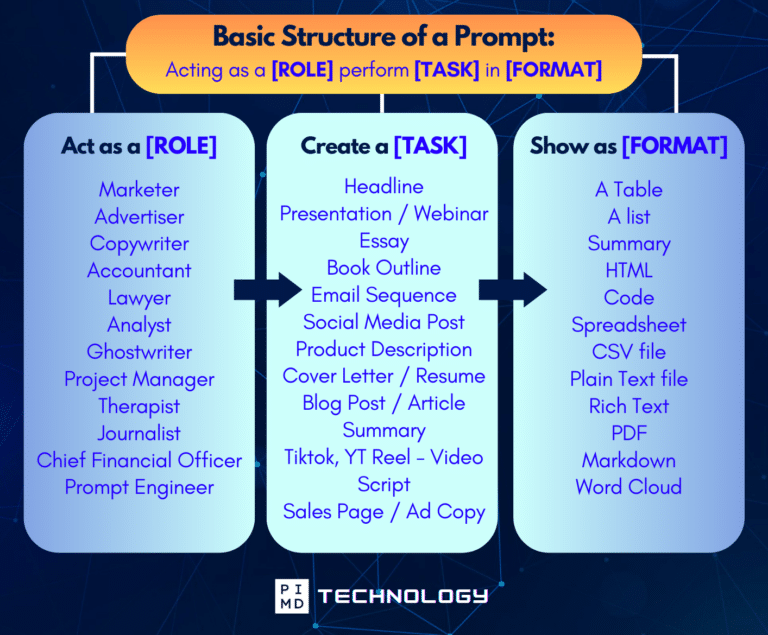
Unlock the Full Power of ChatGPT With This Copy-and-Paste Prompt Formula!
Download the Complete ChatGPT Cheat Sheet! Your go-to guide to writing better, faster prompts in seconds. Whether you’re crafting emails, social posts, or presentations, just follow the formula to get results instantly.
Save time. Get clarity. Create smarter.
One Honest Caveat
I want to be clear about what this is and what it isn’t.
This is a tool for staying current and orienting yourself to a topic faster. It’s not a substitute for your judgment, your training, or primary sources when the stakes are high. And there are real AI legal safety considerations to keep in mind, never put patient-identifiable information into a public AI tool. Always sanity-check the output, especially for nuanced clinical scenarios.
Think of it like having a really well-read colleague who can quickly brief you before you walk into a decision. You’d still bring your own expertise to the table. This just gets you up to speed faster.
On a side note, if you like stuff like this we actually have a physician’s ChatGPT cheat sheet. It’s worth checking out if you want to upgrade your ChatGPT experience.
Start Somewhere. But Don’t Skip the Thinking.
Here’s what I keep hearing from physicians in our community: “I barely have time to eat lunch. When am I supposed to keep up with the literature?”
That’s the real pain point. It’s not that we don’t care. It’s that the mental load of a full patient day leaves almost nothing in the tank for self-directed learning. The reading pile grows, the guilt compounds, and eventually you just stop trying.
If this prompt helps you chip away at that, it’s worth trying. But if you want to go deeper, AI skills for physicians are becoming more important than ever. This is just one of them.
AI doesn’t replace your clinical judgment. It doesn’t replace primary sources when you really need them. And it can be wrong, especially on nuanced or evolving topics. Always sanity-check what it gives you. Treat it like a well-read colleague who did a quick lit review for you, not like an attending signing off on a plan.
Do your due diligence. Verify what matters. And don’t put anything patient-specific into a public tool.
With that said, if you’ve been meaning to get current on a topic and haven’t had the time, this is a pretty low-risk place to start. And if you’re curious how elseAI can help physicians save time across the board (not just with research), that rabbit hole is worth going down too.
What topic have you been putting off? I’d genuinely love to hear it.
The goal is not to automate everything. It is to reduce friction in one area at a time.
Download The Physician’s Starter Guide to AI – a free, easy-to-digest resource that walks you through smart ways to integrate tools like ChatGPT into your professional and personal life. Whether you’re AI-curious or already experimenting, this guide will save you time, stress, and maybe even a little sanity.
Want more tips to sharpen your AI skills? Subscribe to our newsletter for exclusive insights and practical advice. You’ll also get access to our free AI resource page, packed with AI tools and tutorials to help you have more in life outside of medicine. Let’s make life easier, one prompt at a time. Make it happen!
Disclaimer: The information provided here is based on available public data and may not be entirely accurate or up-to-date. It’s recommended to contact the respective companies/individuals for detailed information on features, pricing, and availability. All screenshots are used under the principles of fair use for editorial, educational, or commentary purposes. All trademarks and copyrights belong to their respective owners.
If you want more content like this, make sure you subscribe to our newsletter to get updates on the latest trends for AI, tech, and so much more.
Further Reading

